


“Everything can be formulated as an optimization problem.” Yann LeCun
- Optimization Engines in the hands of Subject Matter Experts
- Finding Multiple and Optimal Decisions

Rule Solver™ is the Decision Optimization component of the OpenRules Decision Intelligence platform. It adds optimization capabilities to Business Decision Modeling by integrating Rule Engine with off-the-shelf Constraint and Linear Solvers. It empowers business analysts to tackle complex business problems that conventional rule engines are not designed to solve.

With Rule Solver the creators of business decision models concentrate on “WHAT” instead of “HOW” by defining relationships between unknown decision variables and relying on predefined search strategies to find multiple or optimal decisions. Rule Solver introduces new types of decision table columns that define unknown variables and their relationships (constraints), allowing a user to mix and match business rules with technical constraints within the same decision tables.

Optimization-based AI Agents. The “Loan” and “Inside/Outside Production” AI agents showcase optimization-based decision models implemented with RuleSolver. They demonstrate how LLM-driven dialogues can guide end users toward the most appropriate decisions — even allowing them to introduce additional constraints on the fly that fall outside the original decision model. Together, they empower non-technical users to confidently engage with complex optimization problems.
Samples. Look at various samples of declarative decision models implemented using Rule Solver. Most of them use the predefined top-level decision table “DefineAndSolve“:

It means a custom decision model needs to define two sub-decisions:
- “Define” for Problem Definition and
- “Solve” for Problem Resolution.
Here is an example of such sub-decisions:
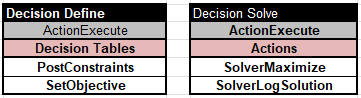
Problem Definition. Usually, you concentrate on the Problem Definition (“Define“) by defining your unknown decision variables (“DefineVariables”) and by posting constraints on them (“PostConstraints”). There are several predefined column types to do that.
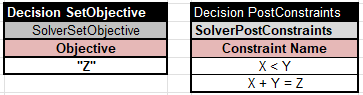
Consider a very simple example. There are 3 variables X, Y, and Z with possible values from 1 to 10 and two constraints X < Y and X + Y = Z. We need to find a solution (values of X, Y, and Z) that maximizes Z.
As usual with OpenRules decision models, you start with the Glossary:

The following tables define the objective and post constraints:
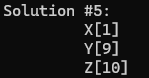
When you execute this decision model with “test.bat”, it will produce the following results:
You may include Solver’s columns such as “SolverDefine” and “SolverPost” inside regular OpenRules decision tables to create variables and then to post constraints conditionally. Consider examples from the decision model “VacationDays“. Here is the Glossary
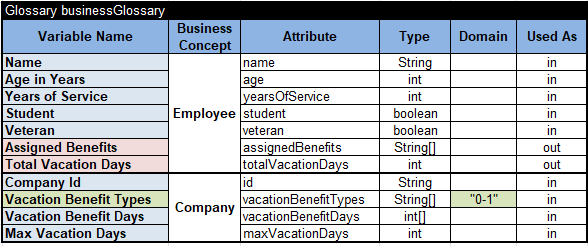
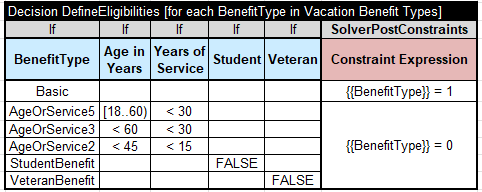
It defines an array of Solver variables for each business variable in the regular array “Vacation Benefit Types”. Then we can post constraints mixing known business decision variables and Solver (yet unknown) variables using intuitive expressions:


You can use regular arithmetic and logical operators inside Solver expressions. You can also use predefined global constraints such as “AllDiff,” which states that all elements within an array must all take distinct values. Here is an example from the decision model “Where is Zebra?” with complex constraints defined intuitively:

Problem Resolution. For the Problem Resolution, you may usually rely on the predefined methods, such as “SolverFindSolution” used inside the decision table “Solve” above.
Instead of “SolveFindSolution”, you may use the predefined methods “SolverMinimize” or “SolverMaximize” for an already defined objective. Alternatively, you may use the table:

If your solving method is “SolverFindSolution”, you don’t even have to create the table “Solve”; by default, Solver automatically calls this method plus “SolverLogAllVariables”.
You may find many complete examples of RuleSolver’s decision models here. You will notice that all these decision models are declarative as they concentrate on WHAT instead of HOW.
While traditional pure rules-based decision models expect subject matter experts to specify all (!) rules that lead to a single decision, Rule Solver allows them to specify only major business rules/constraints, and then will automatically generate possible decisions and even find the optimal one!
Rule Violations. Rule Solver allows business analysts to deal with rule violations: they may adjust business rules by defining penalties for their violations, and then the decision model will produce an optimal decision that minimizes the total rule violations. See a complete example “MapColoringPreferences” in the standard RuleSolver installation.
Rule Solver also offers a more business-friendly representation of constraint satisfaction and optimization problems than traditional Constraint and Linear solvers. Its implementation is based on the JSR-331 standard and an open-source Java Solver that allows the use of various underlying off-the-shelf, open-source, and commercial solvers without any changes to the decision models.
Being a component of OpenRules Platform, Rule Solver naturally utilizes its integration and deployment mechanisms. You may easily deploy Rule Solver decision optimization models as an Decision Optimization Microservices, such as AWS Lambda or MS Azure functions.
Decision Optimization Services. OpenRules, Inc. provides professional services to assist customers in the development of decision optimization services deployed on-prem or on any cloud. If you are interested, please contact consulting@openrules.com.
Any issues? Contact support@openrules.com – we will help.


