

This decision model demonstrates how to apply Rule Solver to the business decision model “Vacation Days Advanced” that requires optimization. We will follow these implementation steps:
- Problem Description and Analysis
- Test Cases and Glossary
- Business Logic Implementation
- Testing
- Deployment as AWS Lambda.
Problem Description and Analysis. This problem was defined in the DMCommunity Challenge. Every employee receives vacation days according to the following rules:

The objective of this problem is to give an employee as many vacation days as s/he is eligible to while satisfying all 7 rules. Rule 7 explicitly specifies the maximum of 29 vacation days that could be given to any employee. However, now not only Rule 2 and 4 can take us above the 29 days limit but many other combinations of extra days can do it as well. If we apply traditional rules-based approach such as DMN, we would need to consider ALL possible combinations of extra days that would lead us to unmaintainable rules. So, it’s much more practical to apply an integrated business rules and optimization approach within the same decision model.
Test Data. Before jumping to the implementation, we should define test data for our future decision model. The following Excel table in the OpenRules format describes a Company “ABC” with its 6 Vacation Benefit Types and the corresponding Vacation Benefit Days. It also includes the “Max Vacation Days” limit of 29 days:

The following table describes different employees of the company XYZ that will be used for testing of our decision model:

And we will define various test cases with expected results in the column “Total Vacation Days” in this table:

We will keep these tables in the Excel file “rules/Test.xls”
Glossary. We will define the corresponding glossary as follows:
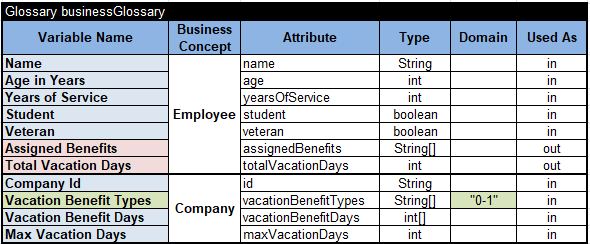
For each element of the input array “Vacation Benefit Types,” this glossary defines a constrained variable named by the proper benefit type. This Solver variable represents employee eligibility for the proper benefit types:
- 0 – non-eligible
- 1 – eligible.
It has been defined in the column “Domain” as “0-1”.
Business Logic Implementation. Our business logic should define the problem constraints using the above Solver variables (unknowns of the problem). To implement the limitations expressed in rules 1-7 above, we need to post the proper constraints. The table “DefineEligibilities”
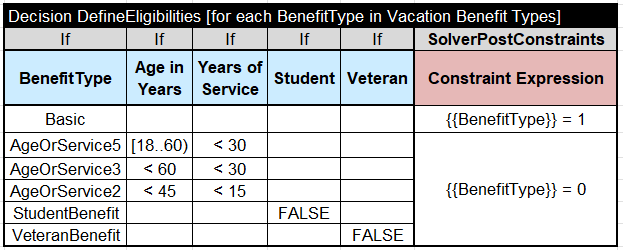
iterates through all “Vacation Benefit Types” and, based on the current value of the “BenefitType,” posts a constraint on the variable with name {{BenefitType}} = 1 (Eligible) or {{BenefitType}} = 0 (Not Eligible). The use of curly brackets at the beginning and end of the variable name directs OpenRules to use the underlying Solver variable and not its name.
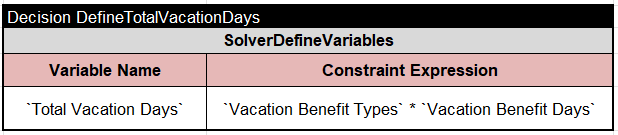
Then we can define the problem objective as a constrained variable “Total Vacation Days” equal to the scalar product of array of unknown constrained variables “Vacation Benefit Days” and the input array “Vacation Benefit Days” with already known integer values for each benefit type. The table “DefineTotalVacationDays” uses the column “SolverDefineVariables” to specify the proper scalar product as a constraint expression with the operator “*”:
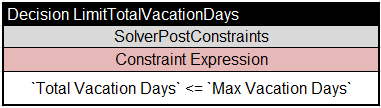
To limit the total vacation days by Max Vacation Days, we use this table:
The next table sets the optimization objective:

“Note that the variables “Vacation Benefit Days and Vacation Benefit Days are taken in backticks because their name contain spaces.
Finally, we use the following tables “Define” and “Solve” to define and solve the problem:

The table “Solve” uses the predefined method “SolverMaximize” to express the problem objective “Total Vacation Days” should be maximized.
We may also add the table

that will be automatically invoked by Solver after a solution is found.
Testing Decision Model. To execute this decision model against the above test cases, we can double-click on the standard batch file “test.bat”:

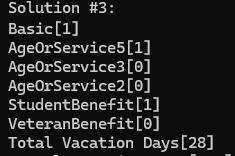
For example, the first test found an optimal solution from the third attempt:
Deployment as AWS Lambda. To deploy the tested decision model as a decision microservice, we can use the standard OpenRules one-click AWS Lambda deployment mechanism.
Now we can simply double-click on the standard file “deployLambda.bat”. We also can test a newly created AWS Lambda function using the generated file “testLambda.bat” (it includes the invoke URL). The execution protocol shows the automatically generated JSON for every test. Then we can use it to test the same Lambda function from the POSTMAN. Here is the execution request and response:


