

The project “openrules.samples/AI/PatientTherapyMCP” demonstrates how to deploy the “PatientTherapy” decision model as an MCP Server. First, we need to do the following:
- Add “mcp=http” to the “project.properties” file.
- Update “pom.xml” with the “openrules-mcp” dependency and a special plugin.
Then we need to register this MCP Server with the selected AI Agent (such as OpenAI Codex or Claude Code). We can use one of two MCP transport mechanisms:
- STDIO (standard input/output) for local processes
- Streamable HTTP for local or remote connections
STDIO. First, package the project by running the standard “package.bat”. It will package this decision model into the file “PatientTherapy_MCP_Server.jar” inside the folder “target”. Let’s assume that the full path to this jar-file is “C:\OpenRules.12.0.0\PatientTherapyMCP\PatientTherapyServer\target\PatientTherapy_MCP_Server.jar“.
We will demonstrate how to do it using the Codex graphical interface. Select “Settings + MCP Server” and define your MCP server as follows:
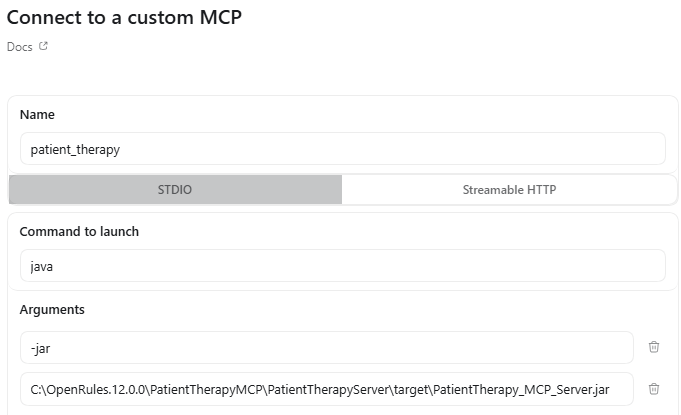
After “Save”, we can initiate the dialogue by entering:
“Use patient_therapy mcp server for any request to determine the appropriate therapy for a patient with Acute Sinusitis. ” Then Codex will respond:

And we can start entering concrete input data for our patient request:
“I have a patient diagnosed with Acute Sinusitis. He is 58 years old, weighs 78 kg, and has a creatinine level of 1.85. Keep in mind that he is Penicillin-allergic and takes Coumadin.“
The actual dialog will be very similar to the one described here.
Streamable HTTP. First, we need to run the following script provided in the file “runServer.bat“:
java -jar PatientTherapyServer/target/PatientTherapy_MCP_Server.jar –http 8090
It will produce:

From the Codex graphical interface, we select “Settings + MCP Server” and define our MCP server as follows:
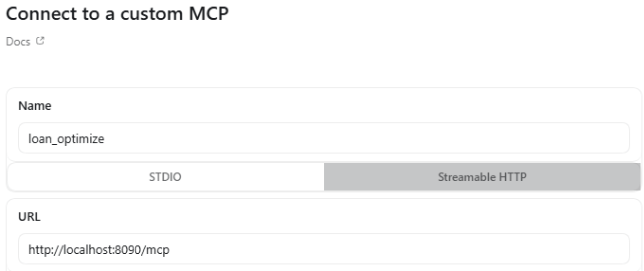
Then the dialogue will be the same as above for STDIO.

