

The Model Context Protocol (MCP), an open standard, has become a widely adopted mechanism for exposing decision models as AI-friendly services across many decision intelligence platforms. OpenRules supports MCP-based deployment, allowing decision models to be published as MCP Servers. We provide several examples illustrating how both rules-based and optimization-based decision models can be converted into MCP Servers capable of communicating with LLMs.
The standard OpenRules installation includes the sample decision models “openrules.samples/AIPatientTherapyMCP” and “openrules.solver/AI/LoanMCP“, which demonstrate how to build and use MCP servers.
Unlike the default deployment of OpenRules decision models as AI Agents — which requires no changes in the decision project — converting a model to an MCP Server requires a certain degree of configuration.
First, we need to do the following:
- Add “mcp=http” to the “project.properties” file.
- Update “pom.xml” with the “openrules-mcp” dependency and a special plugin.
Then we need to register this MCP Server with the selected AI Agent (such as OpenAI Codex or Claude Code). We can use one of two MCP transport mechanisms:
- STDIO (standard input/output) for local processes
- Streamable HTTP for local or remote connections
For STDIO, we need to first package the project by running the standard “package.bat”. Then we need to connect this MCP using the Codex graphical interface. Here is how it can be done for “LoanMCP“:
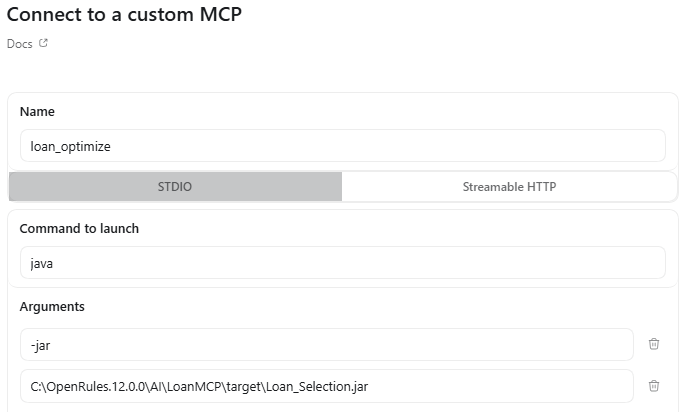
For Streamable HTTP, we need to first run the following script provided in the file “runServer.bat”. It will produce:

Then, from the Codex graphical interface, we need to select “Settings + MCP Server” and define our MCP server as follows:
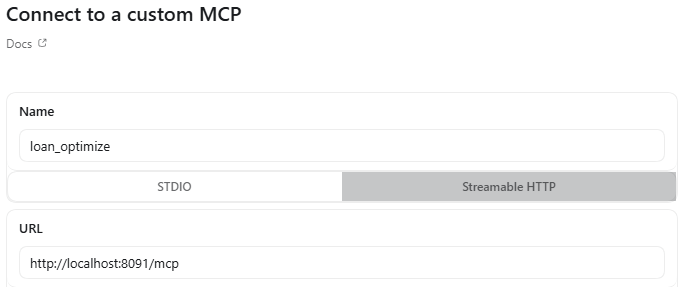
You initiate the dialogue by asking Codex to use the MCP Server with the provided name (e.g., loan_optimize) for the proper requests. See examples of MCP Servers on the right.

