

- Test Cases in Excel
- Test Arrays in “DecisionData” Tables
- References Between DecisionData Tables
- Active/Inactive Test Cases
- Test Cases in JSON Files
- Executing Test Cases
OpenRules provides all necessary tools to build, test, and debug your business decision models. The same people (subject matter experts) who created decision models can create test cases for these models using JSON or Excel tables. They may run execute decision models against these test cases in the batch mode using “test.bat” or using graphical Debugger.
Test Cases in Excel “DecisionTest” tables
You can use predefined OpenRules tables of the types “DecisionTest” and “DecisionData” to create executable test cases for your decision models. For example, the decision model “PatientTherapy“, included in the standard installation “openrules.samples”, contains the following table of the type “DecisionTest” that describes 3 test cases:
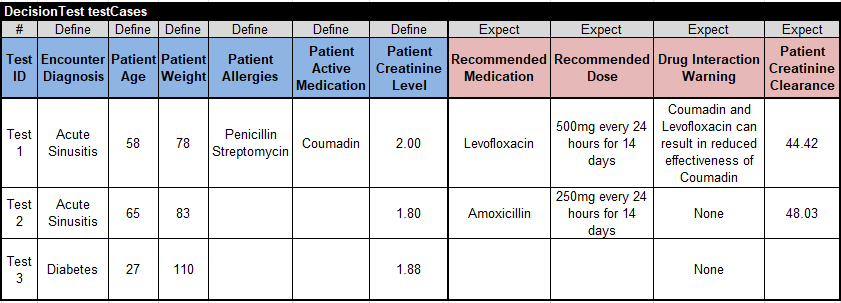
Blue columns of the type “Define” provide test values for input decision variables. Reddish columns of the type “Expect” provide expected values for the proper output decision variables. If the expected values do not match the actual values produced during the decision model execution (using test.bat) OpenRules will display mismatches. For instance, if in the Test 2 you replace the expected Recommended Medication to “Levofloxacin”, you will receive the following error:

This table is self-explanatory. The only column that requires an explanation is “Patient Allergies” that defines a text array of the type String[] with potentially many allergies.

or
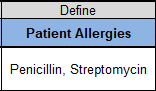
The second allergy is placed in the same cell after a new line (in Excel you use Alt+Enter) or alternatively, you may list all allergies separated by commas.
You are not limited to one DecisionTest table. You may create multiple DecisionTest tables with different names (they just should be unique) and OpenRules will execute all of them.
Test Arrays in “DecisionData” Tables
When test data has a complex organization, instead of one DecisionTest table it is more convenient to define separate data tables one for each business concepts. For instance, here is the data table for the above “PatientTherapy” decision model:
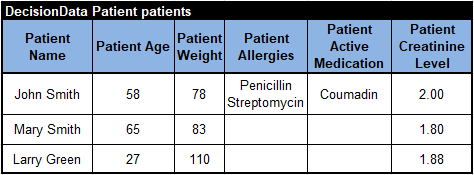
In the left top corner this table specifies its type “DecisionData” following the business concept “Patient” (defined in the Glossary) and the name of the array “patients”.
Similarly, we may define an array “visits” that provides data for the business concept “DoctorVisit”:
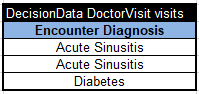
You can use these two arrays “patients” and “visits” to define the same test cases as above but in a more compact way:
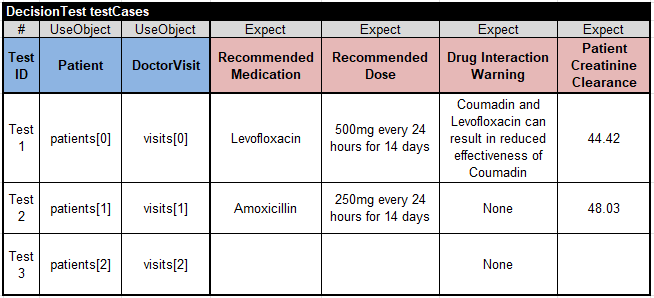
Here instead of 6 columns “Define” we use only 2 columns of the type “UseObject“. Their cells refer to the elements of the arrays “patients” and “visits” using indexes starting with [0], e.g. patients[0] refers to the first element of the array patients, and visits[2] refers to the third element of the array visits.
Note. All keywords “Define”, “Expect”, and “UseObject” are case-sensitive.
References Between DecisionData Tables
Here is an example from the project “OrderPromotion” from the standard installation “openrules.samples”. The following DecisionData table defines an array of order items:
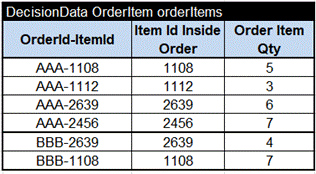
And this DecisionData table defines an array of order that specifies which order items from the array “orderItems” belong to which orders:
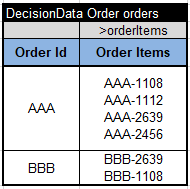
The 2rd column in the 2rd row includes the reference “>orderItems”. It tells OpenRules that the names such as “AAA-1112” or “BBB-2639” are actually the references (“primary keys”) to the proper rows in the array “orderItems”. In the second column each Order Item Id starts with a new line (in Excel use Alt+Enter).
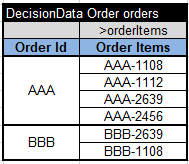
Alternatively, you may put Order Items Ids in separate sub-rows in the second column and merge the proper cell in the first column:
You also may select which test cases you want to test at any moment. You may use the column of the type “Active” to mark the active test cases. For example, in the example “CreditCardApplication”
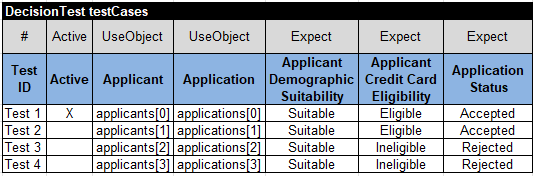
only the first test case is marked with “X”. So, during the execution, only this test case will be tried. If all cells in the column “Active” are empty, then all tests will be executed.
Frequently, you may already have your test data specified in the JSON format. For instance, the above decision model “PatientTherapy” includes the folder “data” with the JSON files “Test1.json”, “Test2.json”, and “Test3.json”. Here is the first test in JSON:
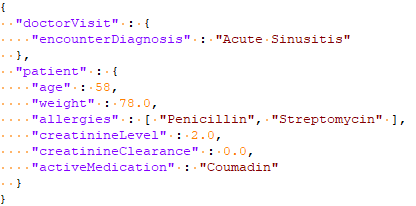
To tell OpenRules that you want to use these JSON files for testing, you can use the following DecisionTest table:
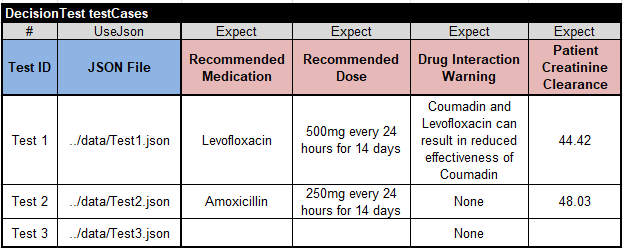
Here we use only 1 column of the type “UseJson“. Its cells refer to the elements of the proper JSON files inside the folder “data” located on the same level as the folder “rules”.
After you define test cases, you need to adjust the standard file “project.properties”. An example of such a file was provided for the introductory model as follows:

The property “test.file” specifies the name of the file that contains your test cases.
To execute your test cases, you need to double-click on the standard file “test.bat“. If you run it for the first time or made any changes in your decision mode, first it will build your model. During the “build” OpenRules will do the following:
- analyze the decision model for errors and consistency.
- if everything is OK, it will automatically generate Java code for your model used for testing and execution.
- if OpenRules finds errors in your design, it will show them in red in the execution protocol.
- Runs the generated code against your test cases.
OpenRules is trying to find as many errors as possible in your decision model and report them in friendly business terms.
If there are no errors, OpenRules execute it against all test-cases and you will see the execution protocol that shows all executed actions and their results. Along with the execution protocol, “test.bat” also produces the explanation reports in the folder “target/reports” using a friendly HTML format. It shows all executed rules and values of the involved decision variables in the moment of execution. See examples of the protocol and HTML reports at Logging, Auditing, and Explainability.
 Decision Intelligence Platform


