

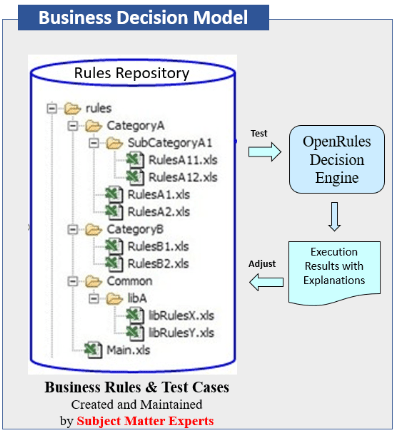
OpenRules utilizes the well-established spreadsheet concepts of workbooks, worksheets, and tables to build enterprise-level rule repositories. Such repositories are comprised of multiple Excel workbooks with worksheets and decision tables placed in different folders to maintain business logic distributed by logical categories.
OpenRules decision models are usually organized in so-called “decision projects” that are placed in local or remote folders. Decision projects usually include a rule repository, a test repository, and project files for building, testing, exploding, and deploying business decision models as ready-to-run decision services.
Many standard decision projects included in the OpenRules installation have a simple organization. For example, the standard decision project “Vacation Days” is implemented in the folder “VacationDays” with this organization:
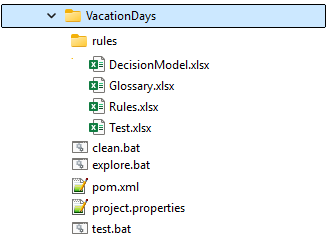
Here the sub-folder “rules” is the rule and test repository with 4 xlsx-files:
- DecisionModel.xlsx: usually contains a model description in plain English and the table “Environment” that describes its organization:
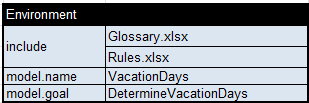
The “include” properties refer to the files included in this decision model. The properties “model.name” and “model.goal” define the decision model’s name and its main goal, the main method (decision table or objective) to be executed.
- Glossary.xlsx: describes all business concepts and decision variables
- Rules.xlsx: contains decision tables that implement decision logic
- Test.xlsx: contains test cases.
There are also a few project files for building, testing, exploding, and deploying business decision models:
- pom.xml: a configuration file with dependencies and project information required for building this decision model as a Maven project. It is almost the same for all OpenRules projects and only <artifactId>VacationDays</artifactId> should be customized and more dependencies can be added for different deployment options.
- project.properties: a test file that defines the main entry point as the property “model.file=”rules/DecisionModel.xlsx” and test cases as “test.file=”rules/Test.xlsx”.
- test.bat: a batch file that validates and builds a decision model, and if there are no errors executes it against test cases.
- clean.bat: cleans the already built decision model.
- explore.bat: starts a Graphical Explorer for this decision project.
Real-world decision models usually have much more complex organization. Instead of being represented as one “monolithic” decision model they represented a set of multiple decision models that implement various sub-decisions of the main decisions. Smaller decision models can be tested separately and deployed as standalone loosely coupled decision services. Then the main decision model can be built by orchestrating smaller decision models or services.
OpenRules provides a relatively complex example “Loan Services” that implements a loan origination decision model represented as a library of interrelated decision models. You may consider it as a prototype of a more complex organization of decision models.
Complex decision models can be distributed between three major repositories:

The folder “rules” represents the Rule Repository consisting of multiple sub-folders:
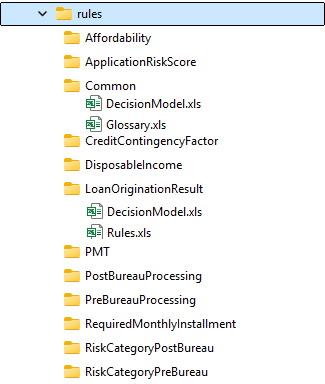
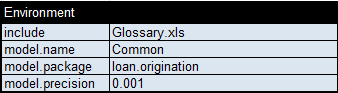
Here the folder “Common” contains the file “Glossary.xls” with a common glossary for all included decision models. Its file “DecisionModel.xls” contains the Environment table that refers to this “Glossary.xls” and defines other common properties:
All other sub-folders contain at least two files:
- DecisionModel.xls: with the Environment table that includes a reference to the Common “DecisionModel.xls” and its own Excel files with the proper rules
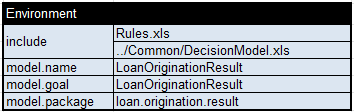
- “Rules.xls” (or multiple similar files) that implement business logic.
The folder “LoanOriginationResult” is the folder that implements a decision model for the top-level objective and invokes other separately implemented and deployed decision models.
Test Repository
The folder “tests” represents test cases for all included decision models. They are distributed between sub-folders with the same name as sub-folders of the folder “rules”. Each sub-folder includes its own files “Test.xls” with test cases for the proper decision projects.
Project Repository
The folder “projects” represents all decision projects for all included decision models. They are distributed between sub-folders with the same name as sub-folders of the folder “rules”. Each sub-folder includes files “pom.xml”, “project.properties”, “test.bat”, and “explore.bat” needed to build, test, and explore the proper decision projects as stand-alone decision models. Usually the folder “projects” includes a special sub-folder “RegressionTest” for testing all included decision models with one click.
Logical and Physical Repositories
The following picture shows the logical and physical organizations of OpenRules repositories:
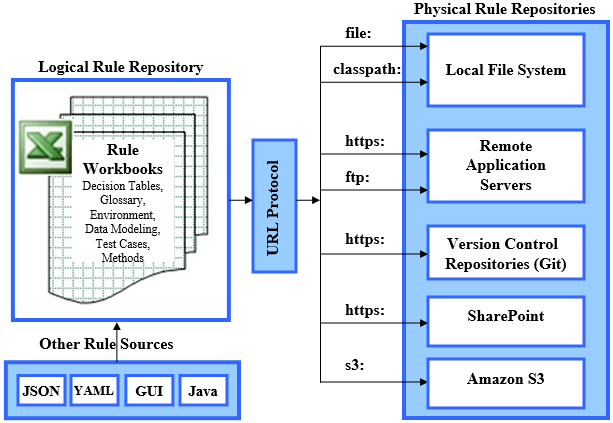
Logically the OpenRules Repository may be considered as a hierarchy of interrelated Excel workbooks and related files. Each workbook may be comprised of one or more tables. Most typical OpenRules tables are decision tables that are used to represent business rules. Along with decision tables of types Decision and DecisionTable, OpenRules supports tables of other types such as Environment, Glossary, DecisionTest, DecisionData, Method, or Code tables. See examples of these tables in the Reference Guide.
Physically all workbooks are saved as standard xlsx- or xls-files with well-known formats. The proper Excel files may reside in the local file system, remote application servers, or standard version control systems such as Git, MS SharePoint, or Amazon S3.
OpenRules uses an URL pseudo-protocol notation with prefixes such as “file:“, “classpath:“, “https://“, “ftp://“, “s3://“, etc.
Typically, each rule repository has an entry point where its main Excel file is located. Frequently this file is called “DecisionModel.xls” or “DecisionModel.xlsx”. The physical location of this file should be defined in the local file “project.properties” using the property “model.file“. It is a good practice to also specify here the property “test.file” as an entry point in your test repository.
You may keep your rule repository in the local file system on the machine where you installed OpenRules. In this case, references to the repository files are supported by the URL protocols “file:” or “classpath:“.
For simple decision models (e.g. the above model “VacationDays“) you may define entry points as follows:

You may use here the URL “file:rules/DecisionModel.xlsx” but the “file:” can be omitted as it is assumed as the default URL.
For complex decision models in the local files systems (e.g. the above model “LoanServices“) you may define the entry points as follows:

All paths here are relative to the location of the file “project.properties”.
The file “DecisionModel.xlsx” (the main entry point!) contains the Environment table with include-statements that refer to other Excel files relative to the location of this file. The referred files may include their own Environment tables with include-statements relative to their locations.
If the file “DecisionModel.xlsx” is located directly in the local project classpath, you may use the URL “classpath:rules/DecisionModel.xlsx“.
The file “DecisionModel.xlsx” also contains the major properties of this decision model such as “model.name”, “model.goal”, and others.
You may keep your rule repository in the remote repositories such as remote application servers to the standard Version Control Repositories such as GitHub. In these cases, references to the repository files are supported by the URL protocols “https:” or “ftp:“. For example, if your rule repository is located at a website “http://www.example.com” in the folder “rules”, you may use the URL “http://www.example.com/rules/Main.xls“.

Amazon S3 (Simple Storage Service) or AWS S3 is an object storage service offering industry-leading scalability, data availability, security, and performance. It provides cost-effective storage classes and easy-to-use management features with a very simple configuration. To keep your decision models at AWS S3, you need to have an active AWS account and set up your security AWS Credentials (access key ID and secret access key) in the default file ~/.aws/credentials.
OpenRules provides a special protocol “s3://” to access files saved at AWS S3. For example, the standard OpenRules installation includes the sample project VacationDaysS3 with the following “project.properties”:
model.file=s3://openrules-rulesets/VacationDays/rules/DecisionModel.xlsx
test.file=s3://openrules-rulesets/VacationDays/rules/Test.xlsx
Of course, you need to use your own AWS S3 folder instead of “openrules-rulesets”.
MS SharePoint as Rule Repository

MS Sharepoint is a single platform for storing and sharing documents across the organization. It allows employees from different departments, offices, or regions to access important documents securely. SharePoint’s version control ensures employees are always working with the latest version, while older versions are preserved. Using SharePoint Teams can collaborate on documents in real-time using Microsoft Office integration (Word, Excel, PowerPoint).
These powerful SharePoint’s capabilities make it a natural storing platform for rule repositories. Large OpenRules customers effectively use the OpenRules protocol “http://” to access their rule repositories kept on SharePoint.
However, to use OpenRules repository located on SharePoint you need to configure a special OpenRules application on SharePoint and set up your runtime environment. This OpenRules-SharePoint integration process is described on this page.
After you complete the above SharePoint integration, you may migrate your decision project from local files to SharePoint. You only need to make the proper changes in the properties “model.file” and “test.file” in your local file “project.properties“. For example, we moved Excel files from our standard decision model “VacationDays” to our SharePoint and modified these properties as follows:
- model.file=https://openrules.sharepoint.com/sites/openrules.samples/Shared%20Documents/VacationDays/rules/DecisionModel.xlsx
- test.file=https://openrules.sharepoint.com/sites/openrules.samples/Shared%20Documents/VacationDays/rules/Test.xlsx
You can find a new sample project VacationDaysSharePoint with the above “project.properties” in the standard OpenRules installation. You may use it as a prototype for your own decision project.
 Decision Intelligence Platform