

Rule Learner is a Machine Learning component of OpenRules Decision Intelligence Platform, and to use it you need to have OpenRules Decision Manager already installed.
Download and Install
You may download Rule Learner from
- OpenRulesLearner_x.y.z.zip for Windows
- OpenRulesLearner_x.y.z.tar.gz for Mac or Linux.
Unzip the downloaded file to your hard drive, and you will see the folder “OpenRulesLearner_x.y.z” with two sub-folders:
- openrules.config
- install
- openrules.learner
- learning.sources
- createModel
To install OpenRules Learner, you need to open the folder “openrules.config” and double-click on “install.bat” (or run “install” if you use Unix or Mac).
Generating Decision Models
The sub-folder “learning.sources” of the folder “openrules.learner” contains CSV files with examples of various business problems such as Lenses, Credits, Diabetes, etc. You can use these examples or your own examples to generate the proper decision models.
To do this, you simply click on “openrules.learner/createModel.bat” to start the dialog similar to this one:
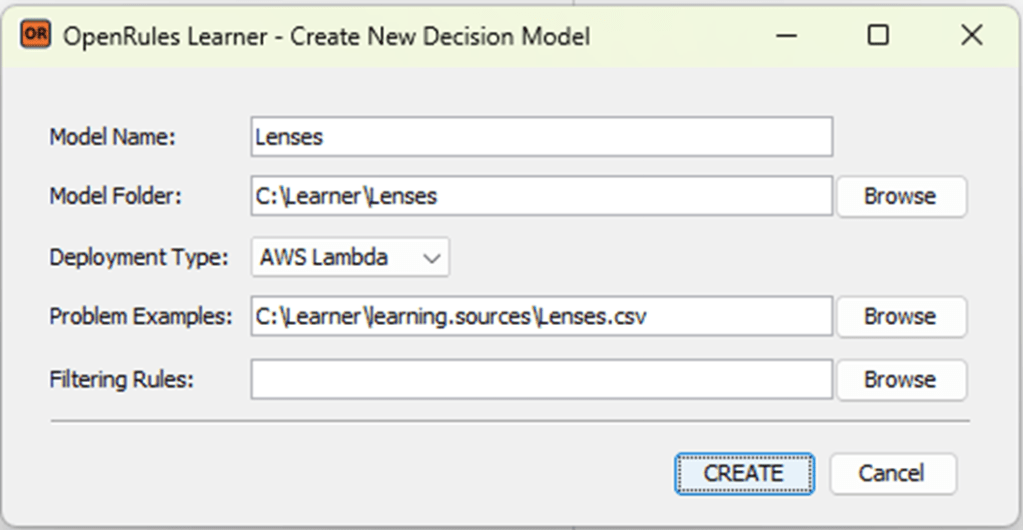
It allows you to enter your Model Name and location, select a Deployment Type, and choose a CSV file with your problem examples. after you click on the button “CREATE”, Rule Learner will generate the proper decision model (in this case “Lenses” inside the folder “C:\Learner\Lenses”). Here is the typical generated content:
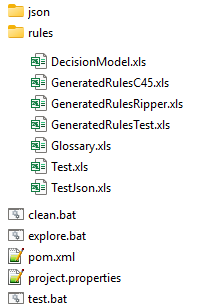
The folder “rules” contains all generated Excel files that represent this decision model. Other files will be used for testing/execution, analysis, deployment, and enhancement of the generated decision model.
The detailed description is provided in the example “Lenses“.

 Decision Intelligence Platform