
OpenRules allows you to migrate SQL queries to business rules. The standard OpenRules installation includes two simple examples in the installed folder “openrules.db“: “EvaluateOrders” and “UnpaidOrders“.
The project “SqlInsideRules” combines these two decision models in one executable decision model and adds more advanced features.
Instead of keeping all tables in one file “DecisionModel.xlsx”, the rules repository for this model uses multiple files:
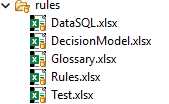
DataSQL.xlsx contains DataSQL tables SelectedOrders and UnpaidOrders from two previous exemples.
Glossary.xlsx contains their corresponding glossaries.
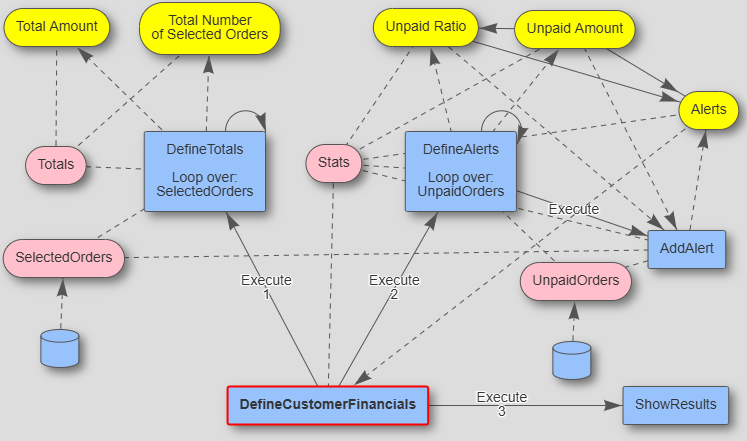
Rules.xls contains all business rules from the previous samples and one main table “DefineCustomerFinancials” that calls the methods “DefineTotals”, “DefineAlerts”, and the combined method “ShowResults”:

DecisionModel.xlsx contains only the Environment table with references to all other included files:

Here is the decision diagram you will see if you run “explore.bat”:
When you run this decision model with “test.bat” it will produce the following results:

If you want to invoke this decision model from your Java, you can use the standard OpenRules Java API demonstrated in the file src/test/java/Test.java:
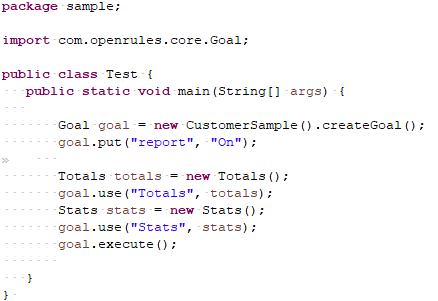
To run this test you need to uncomment the property “run.class=sample.Test” in the file “project.properties”.
You also may deploy this model as a REST service and test it from POSTMAN as the proper dependencies were added to the file “pom.xml”. To do that, execute “runLocalServer” and use POSTMAN with URL “http://localhost:8080/customer-sample” and an empty JSON request {}.
 Decision Intelligence Platform