
The example “Evaluate Orders” deals with the classic MySQL Sample Database that has the following organization:

We could use the following SQL query

to select customer orders with amount > 80000 and status “In Process”.
Let’s create a decision model that can directly select similar orders from the database and calculate “Total Number of Selected Orders” and their “Total Amount”.
We can move the selection criterion from SQL to the following OpenRules table “SelectedOrders” of the type “DataSQL“ :

To incorporate this table in our decision model, we need to define the corresponding business concepts in the Business Glossary:
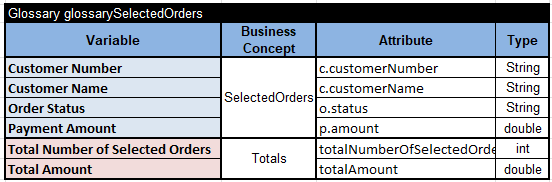
Note that here the business concept “SelectedOrders” has the same name as defined above in the DataSQL table and its attributes use exactly the same names as defined in the query’s SELECT statement (with aliases ‘c’, ‘o’, and ‘p’).
We also added another business concepts “Totals” with our output decision variables Total Number of Selected Orders and Total Amount.
The following decision table ”DefineTotals” can do all calculations:
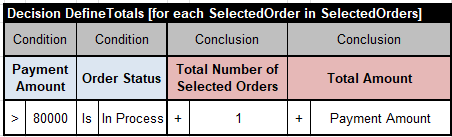
This table iterates over SelectedOrders using the SQL query defined in the DataSQL table “SelectedOrders”. For each selected “SelectedOrder” this table accumulates decision variables “Total Number of Selected Orders” and “Total Amount”.
To print the results we may use the following table with a snippet of Java:

To finalize our decision model, we may need the main table that executes two already defined tables: “DefineTotal” and “ShowResults”:
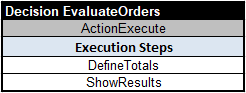
It is also important to define the Environment for this decision model:
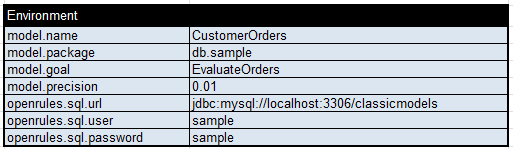
The first 4 properties are standard for the majority of OpenRules decision models. The last 3 properties specify the access attributes to our database.
Before executing our decision model, we need to make sure that the database is open by doing the following: 1) in the Windows Start menu type ‘services’ in the search bar; 2) Scroll down to find ‘MariaDB’, right-click on it, and choose ‘Start the service’.
Now we are ready to execute this decision model using the standard file “test.bat“. It will read directly from the database and will produce the following results:

If your run “explore.bat” you will see the decision diagram and would be able to execute the decision model rule by rules, record by record:

This way we clearly separated the selection logic that is DB-specific and business logic that can be easily adjusted by business analysts and will stay the same when a database is changed. This approach allows subject matter experts to add more complex business logic by simply changing the decision tables without any changes in DataSQL.
If you want to add more business decision variables, you can make the proper changes in the business glossary and rules, and without any additional coding your decision model will be ready to execute advanced business logic.
If you need to use additional variables from the database, you may adjust your selection criteria only in the tables DataSQL and the Glossary, and your decision model will work with an updated database. In all cases, no additional programming is required.
 Decision Intelligence Platform