

| Feature | Deprecated in Release | Removed in Release |
|---|---|---|
| JDK 1.8 Support | 10.4.0 | 11.2.0 |
| DecisionTableIterate and ActionIterate | 9.1.1 | 10.4.0 |
| DecisionTableAssign and ConclusionVarOperValue | 9.1.0 | 10.5.0 |
| DecisionTableSort and ActionSort | 9.1.1 | 10.4.0 |
| DecisionTableTest | 9.0.0 | 11.0.0 |
| Don’t use Environment Table in your Test files | 10.4.0 | 11.0.0 |
Below is the list of OpenRules features that have been deprecated and/or replaced with more sophisticated and user-friendly features.
JDK 1.8 Support
Some of our customers still use Java 8 despite the fact that Oracle ended its support in 2022. To support these customers, our Long-Term-Support (LTS) Release 10.4.* will continue to work with JDK 8 or higher. However, new non-LTS releases and the next LTS releases expected in 2026 will support JDK starting with Java 17 or higher.
DecisionTableIterate
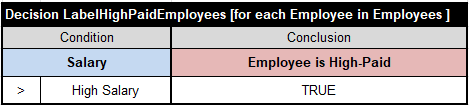
Decision tables “DecisionTableIterate” has been replaced with a regular decision table of the type “Decision” or “DecisionTable” and the phrase “[for each <collection-element> in <collection>]“. Here is a simple decision table that iterates over an array of Employees and marks some of them as High-Paid:
See the complete sample project “IterateEmployees” with various iteration loops in the standard project “Iterations” in the installation folder OpenRulesDecisionManager.
The following example used the deprecated ActionIterate:
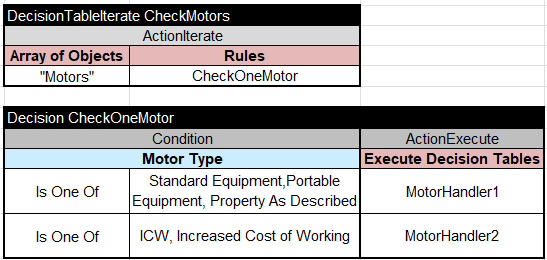
Now instead of two tables “CheckMotors” and “CheckOneMotor” you may use only one table “CheckMotors” with for-each loop:
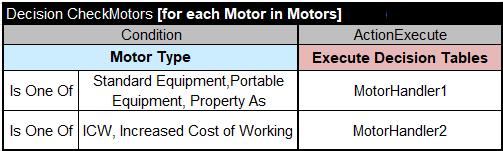
The new for-each loop inside the regular decision table signature makes the old ActionIterate and ActionLoop obsolete.
The old table DecisionTableIterateWithBrake has been replaced with a similar for-each loop that invokes the predefined ACTION-BREAK:
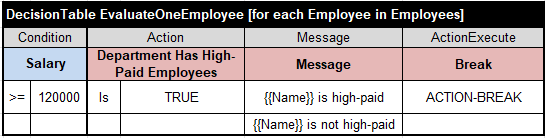
See the complete sample project “IterateWithBreak” in the standard openrules.samples. Read more about interruptions of the iteration loops here.
The old tables DecisionTableIterateWithType and DecisionTableIterate4 have been also deprecated.
DecisionTableAssign
Table “DecisionTableAssign” have been replaced with a regular decision table of the type “Decision” or “DecisionTable” and the action-column “ActionAssign“. For example, instead of the table

use the table
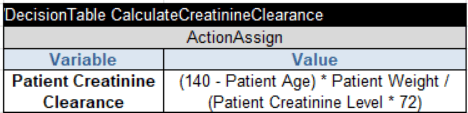
The action “ConclusionVarOperValue” is deprecated as it has been replaced by “ActionAssign”.
The old tables DecisionTableSort and DecisionTableSortUsingRules have been deprecated. Also deprecated is the ActionSort which was used in old releases in tables like this one:
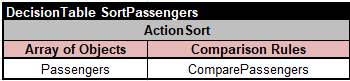
It invoked another table that compares two passengers:
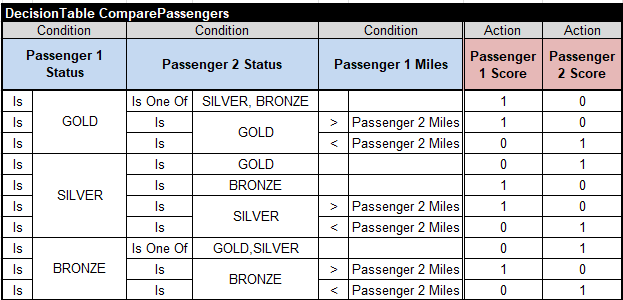
It also required to define two business concepts “Passenger 1” and “Passenger 2” in the Glossary.
New sorting mechanism replaces two tables with just one table with the phrase “[sort <collection-name>] as below:
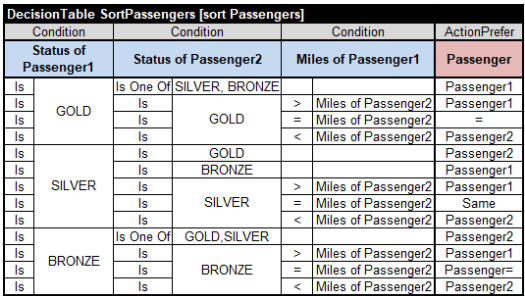
For each pair of passengers “Passenger1” and “Passenger2” this table selects a preferred passenger in the last column of the type “ActionPrefer”. When the statuses of both passengers are the same, the number of frequent miles serves as a tiebreaker. When even the miles are the same, you may use “=” or “Same” (or any other word different from Passenger1 and Passenger2). There is no need to define “Passenger1” and “Passenger2” in the glossary that simply looks as below:
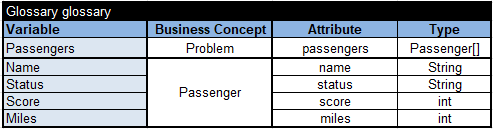
Here the array “Passengers” by itself is a decision variable defined inside the business concept “Problem”. The glossary does not include variables “Passenger1” and “Passenger2” anymore as they are local variables used only inside the table “SortPassengers”. Their names are formed by the type “Passenger” of the array of “Passengers” plus the numbers 1 and 2. See the complete sample project “SortPassengers” in the standard openrules.samples.
DecisionTableTest
The table DecisionTableTest has been renamed to DecisionTest.
Don’t Use Environment Table in Test.xls
In old release we allowed Test.xls to use the Environment table that included a reference to DecisionModel.xls. It is not necessary anymore but may cause an error about a duplicate table name. If your Test.xls still uses such Environment table, please simply remove it.
 Decision Intelligence Platform