

Jan 17, 2024. OpenRules Release 10.1.0 comes with enhanced RuleSolver and RuleDB, and various improvements of the core product:
- New decision modeling constructs for RuleSolver
- Parameterized DataSQL tables in RuleDB
- Support for Nested Loops over the same collection
- Big Decision Tables with Fixed Width Format
- Various Improvements (patterns, templates, bug fixes).
Essentially Enhanced RuleSolver
This release comes with an essentially simplified RuleSolver which now for the definition of the majority of practical problems requires only two tables “DefineVariables” and “PostConstraints“. It also provides predefined methods for the problem resolution so you really may concentrate only on the question “WHAT” and not to worry about “HOW”. RuleSolver 10.1.0 includes many samples – look just at a relatively complex logical problem “Family Riddle“. These problem uses two simple tables “Define” and “Solve”:
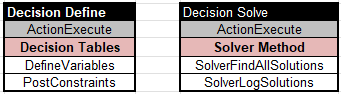
Here are two tables that cover the problem definition:
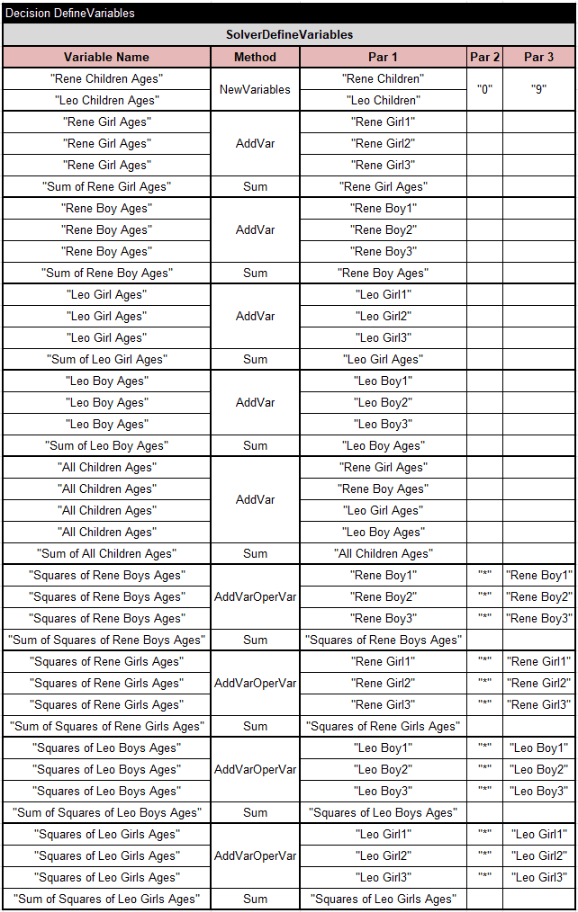
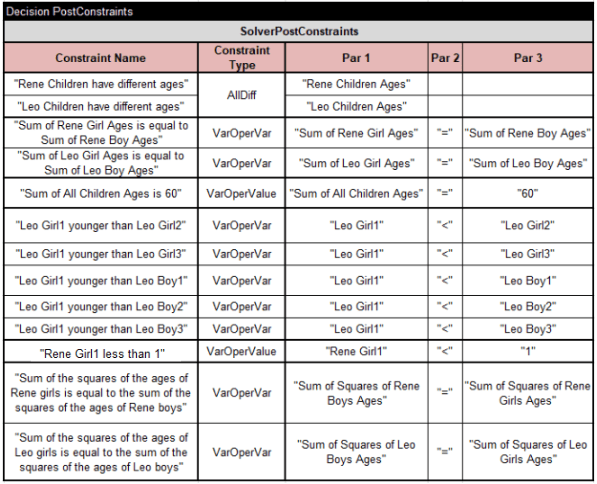
The first column of these tables contains a plain English description of the described decision variable or constraint, and the second column contains names of the predefined methods used to defined them. Columns “Par 1”, “Par 2”, and “Par 3” (some of them optional) contain the parameters of these methods. So far, these parameters are still need to be provided by decision model authors, but in the future we plan to extract them from the plain English formulations using the latest advances in the Natural Language Processing.
RuleSolver examples have been modified using similar decision tables “DefineVariables” and “PostConstraints”.
Parameterized DataSQL Tables
OpenRules “Rule DB” product allows business users to define SQL query directly in OpenRules tables of the type DataSQL. Now you may freely use OpenRules decision variables defined in the Glossary inside your DataSQL tables such as this one:
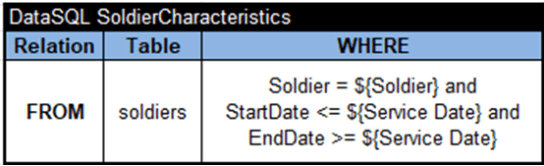
This table corresponds to a simple SQL query that finds all records in the table “Soldiers” with Soldier equal to the current value of the decision variable ${Soldier} and whose ${Service Date} is between StartDate and EndDate defined in the database. Read more here and try the proper sample RuleDB/SoldierPayments.
Support for Nested Loops
OpenRules supports nested loops by using several “for each” statements in the title of a decision table like in the table “CalculateEmployessAtZipCode” above. However, when we need to iterate over distinct pairs of elements inside the same collection, such nested loops become cumbersome. For instance, in the standard sample “DuplicateCharges” we used the following nested loops to determine of the array “Bill Charges” contains duplicates:
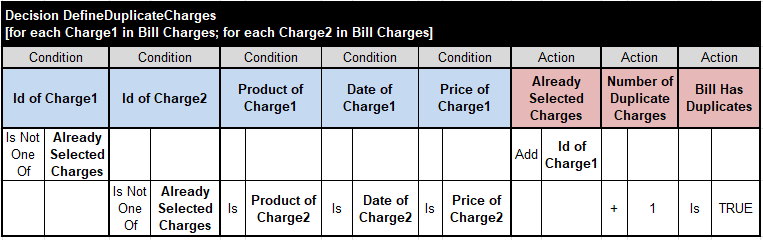
Beside explicit loops, here we needed to create and maintain an intermediate array “Already Selected Charges”. To simplify such nested loops we added a special action “ActionNestedLoops” that allow us to achieve the same results using the following tables:
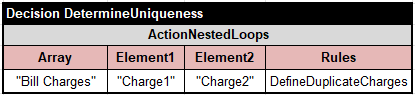
It has 4 parameters: collection (array or list) to be analyzed; the first element and the second element of the collections to be used inside the rules (they need to be defined in the Glossary), and the rules that will be applied to each distinct pair (Element1;Element2):
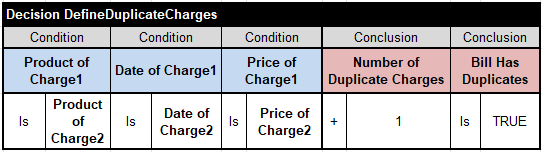
So, from now in situations when you need to analyze distinct pairs of elements of the same array or list use the newly introduced “ActionNestedLoops”. Read more in this post.
Big Tables with Fixed Width Format
OpenRules provides a highly efficient and user-friendly mechanism for handling big decision tables with tens and even hundreds of thousands of rules. Instead of keeping the rules inside an Excel-based table OpenRules customers can keep the rules in external files in the following formats:
- CSV file with the extension “.csv” (Comma Separated Values)
- TXT file with the extension “.txt” (Fixed Width format).
For example, the following decision table
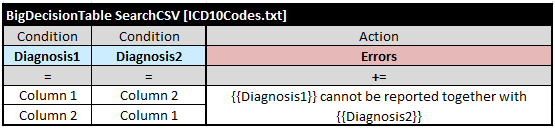
iterates over all rows of the external file “ICD10Codes.txt” (or you may use the CSV file “ICD10Codes.csv”) specified the file in square brackets. For each row it compares the values of decision variables Diagnosis1 and Diagnosis2 defined in the glossary with the current values inside the columns Column 1 and Column 2. Here are the example of the proper csv- and txt-files:
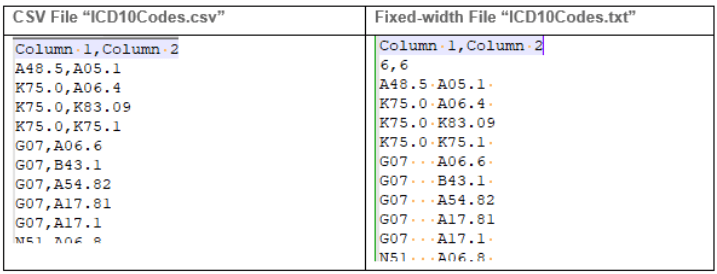
For the fixed-width file on the right the first line provides column names and the second line shows column widths (listed through commas). It is important that each column has enough characters as defined by the column’s width. If the actual width is smaller than the required width, you need to add the corresponding number of spaces (including in the last column).
The decision table “BigDecisionTable” may executed really large external csv- or txt-files 100 times faster than the regular “DecisionTable. You may execute the proper examples “ICD10” and “ICD10WithFixedWidth” added to the standard installation “OpenRulesSamples“.
Note that for consistency reason, big single-hit tables now use the keyword “BigDecisionTable” and big multi-hit tables now use the keyword “BigDecision“. The old keywords “BigTable” and “BigTableMultiHit” remain acceptable.
Various Improvements
Patterns. We added another wildcard character “#” that represents one digit inside pattern for the string comparison operator “Like”. For instance, you may use these conditions:
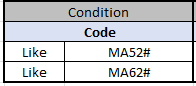
to check is the “Code” starts with “MA52” or “MA62” following by any digit. The pattern “MA52#” is equivalent to “MA52\d”
Templates. We added an ability to define custom conditions and action that use the same names but may have different numbers of parameters. When you define the proper templates of the type “TemplateCondition” or “TemplateAction”, you may add “as <public name>” the end of the template definition. For example, the latest RuleSolver uses 3 templates
- TemplateAction SolverPostConstraints3 as SolverPostConstraints
- TemplateAction SolverPostConstraints2 as SolverPostConstraints
- TemplateAction SolverPostConstraints1 as SolverPostConstraints
The actual name of the custom column used in decision tables is “SolverPostConstraints” but the first template supports 3 parameters, the second one – two parameters, and the third one supports one parameter. Now based on the actual number of parameters the column “SolverPostConstraints” may contains sub-columns for 3, 2, or 1 parameter.
Reworked User Manual. We’ve essentially updated the User Manual to reflect the latest changes and simplify it for business users.
Bug Fixes. We’ve fixed several bugs introduced in previous releases and improved error diagnostics.
Improved Generated Code. We’ve made essential modifications in the automatically generated code. These changes do not affect decision models already created by our customers. At the same time, the newly generated code is better organized internally and, more importantly, is capable to support the upcoming new OpenRules capabilities.
Updated Dependencies. As usual, we updated all OpenRules dependencies using an automated vulnerability check from the NVD. In particular, all our samples now use the latest version 2.22.1 of the Apache logging packages SLF4J and LOG4J, Apache POI 5.2.23, and other 3rd party packages described here.
 Decision Intelligence Platform