

Decision Model
OpenRules-based decision models can be considered as a Glossary surrounded by decision tables that implement business logic for different goals and sub-goals:

Decision Tables
All OpenRules tables start with a keyword in the top left corner:
- Decision (multi-hit)
- DecisionTable (single-hit)
All decision tables execute their rules in top-down order.
Tables of the type Decision execute all satisfied rules and actions of previously executed rules may effect the conditions of the rules executed after them. These tables allow rules overrides. They frequently use to specify decisions and a sequence of sub-decisions.
Tables of the type DecisionTable stop rules execution after they hit the first rule which conditions are satisfied – that’s why they are called single-hit.
Decision table may contain various columns of predefined or custom types such as “Condition”, “Conclusion”, “ActionExecute”, etc.
Simple Decision Tables
Let’s consider how to represent business logic for decision model “Vacation Days“:

To calculate Vacation Days we may use this table of the type “Decision” that executes all satisfied rules in the top-down order:

First, this table will unconditionally assign 22 to the decision variable “Vacation Days”. Being a table of the type “Decision”, it will continue to execute other rules by adding 5, 3, and/or 2 days when the proper conditions are satisfied.
This singe-hit decision table describes business logic for eligibility for extra 5 days:

Similarly we may describe business logic for eligibility for extra 3 and 2 days:

All these tables use keywords “Condition” and “Conclusion” in the second rows. You also may use their synonyms: Condition=If and Conclusion=Action=Then. All conditions are connected by the logical “AND“, e.g. the last rule in the above table “CalculateVacationDays” will be executed only when both the first and the third conditions are satisfied. You may use multiple conclusion columns but they also will be connected by the logical “AND“.
If you want to add an OR-condition, you simply add another rule. All above rules inside decision tables are connected by the logical “OR”.
Default Values
Note that in the table DecisionTable the default value is usually defined by the last rule. For instance, all the above singe-hit decision tables use FALSE in the last row as the default when previous rules are not satisfied.
Contrary, in the table Decision or DecisionTableMultiHit the default value is usually defined by the first rule. For instance, the Decision table “CalculateVacationDays” uses 22 in the first row as the default value for Vacation Days, and all consecutive rules (if satisfied) may change this value.
Glossary
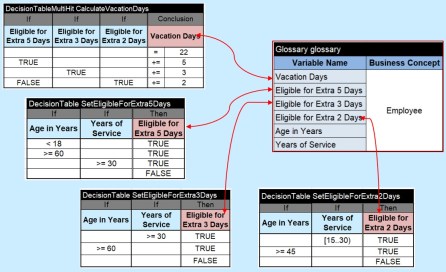
The described decision model “VacationDays” uses the following glossary to “glue” all decision tables together:

It describes all decision variables used in the above tables. Thus, the complete decision model consists of the glossary surrounded by decision tables for all goals:
Operators in Separate Sub-Columns
The above tables use operators in the expressions as < 18 or >= 60. But you also may put operators in special sub-columns like below:

Note that in such cases the title cells such as “Conditions” and “Age in Years” should be merged. By the way, in the very first row all cells are always merged.
There are many predefined operators like Is, Is Not, Is One Of, Is Not One Of, Incudes, Add, etc. – all operators are defined in the User Manual (see Table Conditions and Conclusions).
Multi-Hit Decision Tables
Contrary to single-hit tables of the type “DecisionTable”, a table of the type “Decision” executes ALL satisfied rules one-by-one in the top-down order. Already executed rules can affect the execution of the rules below them. They work more like a sequence of traditional programming statements. For example, consider a situation when the first rule may change a decision variable used in a condition of the second rule:

The first rule unconditionally executes a sub-decision “DecisionValidate” that sets the decision variable “1040EZ Eligible” to TRUE or FALSE. The second sub-decision “DecisionCalculate” will be executed only when 1040EZ Eligible is TRUE.
Another example:

This multi-hit decision table determines a maximum of 3 dates Date1, Date2, and Date3 and assigns it to Maximum Date.
Summary
OpenRules offers two major types of decision tables: DecisionTable and Decision. Used in Excel, they provide business users with a very powerful while intuitive way to represent their business logic. OpenRules customers rely on many predefined types of conditions and conclusions with various operators described in the User Manual. At the same time, they may easily add new domain-specific conditions and conclusions to make the representation of their business logic even more intuitive.
User Manuals
 Decision Intelligence Platform