

Simple Iterations
Iterations with Breaks
Nested Iterations
Iterations in OpenRules Explorer
Special Functions on Collections
Simple Iterations
OpenRules customers may iterate over collections of business objects by adding the phrase [for each <object> in <collection of objects>] at the end of the decision table’s first row. For example, the following decision table

iterates over the array of Employees applying to each Employee the rule: if the current Employee has Salary >= $120,000 then assign TRUE to the decision variable “Employee is High-Paid”.
This table iterates over ALL elements of the array Employees. Sometimes you want to break the iteration under certain conditions.
The following decision table

will stop the iteration loop when at least one “high-paid” employee is found.
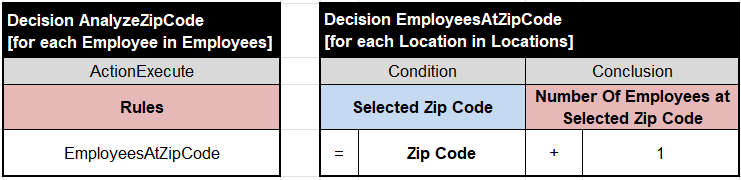
Sometimes you need to deal with iterations inside other iterations (so called “nested iterations”). For instance, you need to calculate how many employees live at a certain Zip code assuming that employees may live multiple location. You can do it using two decision tables:
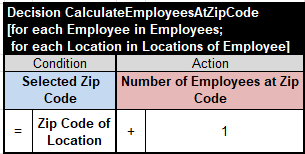
However, you can get the same results with one table:
A more complex example is described in the sample project “ICD10” that deals with two nested iterations and searches a CSV file.
Iterations in OpenRules Diagrams and Debugger
OpenRules Explorer shows the iteration nodes like in this diagram for the project “Iteration”:
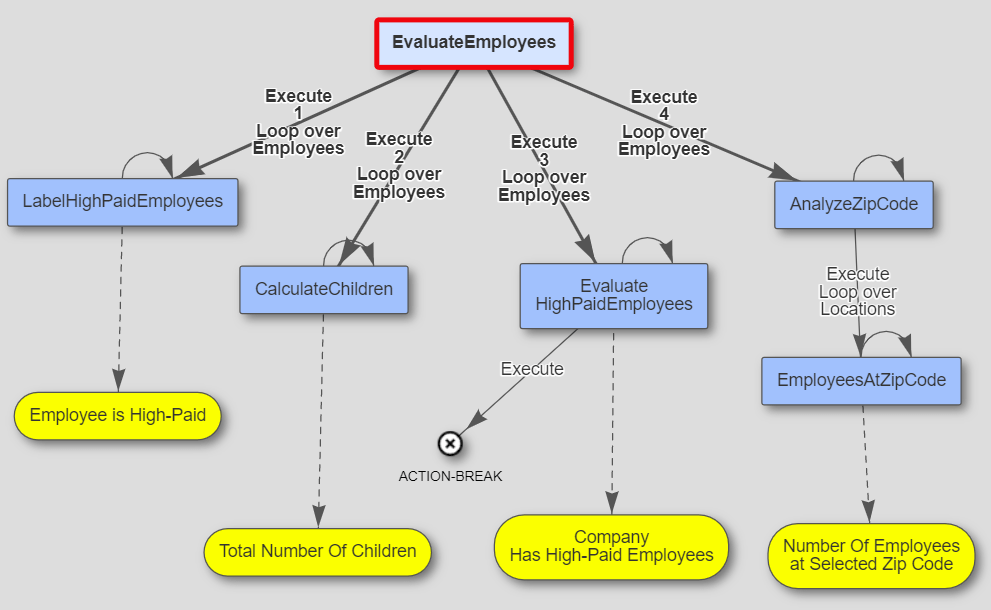
Every iteration node is marked by a “loop” and the arrow leading to this node describes the collection it iterates over.
When you debug the iteration process, OpenRules Debugger will show the current elements of the collections over which you iterate:
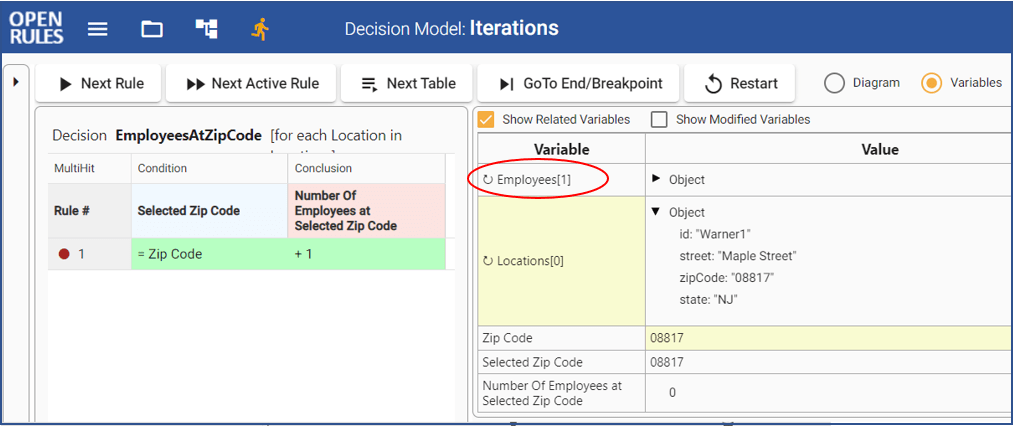
If you debug this model and reach the nested loops over Employees and their Locations you may keep clicking on the button “Next Rule” to see the current elements with their indexes: the red circle shows the current Employees[1] and underneath Locations[0] with their attributes.
This decision model is included in the standard installation as “Iterations“. You may find more decision modes with iterations in the standard repository “openrules.samples”:
- AnalyzeEmployees
- AnalyzeEmployeesWithoutLoops
- AggregatedValues
- MedicalServiceCoverage
- ICD10
- FlightRebooking
Special Functions on Collections
Dealing with collections of objects, many decision models use the same functions to determine the total number of elements, the sum of some object attributes, their average number, minimum/maximum values, etc. OpenRules provides special functions on collections that allow you to avoid using iteration loops.
The standard installation “openrules.samples” includes the project “AnalyzeEmployeesWithoutLoops” which demonstrates the use of such functions. It is slightly different from the decision model “Iterations”. Here is its Glossary:
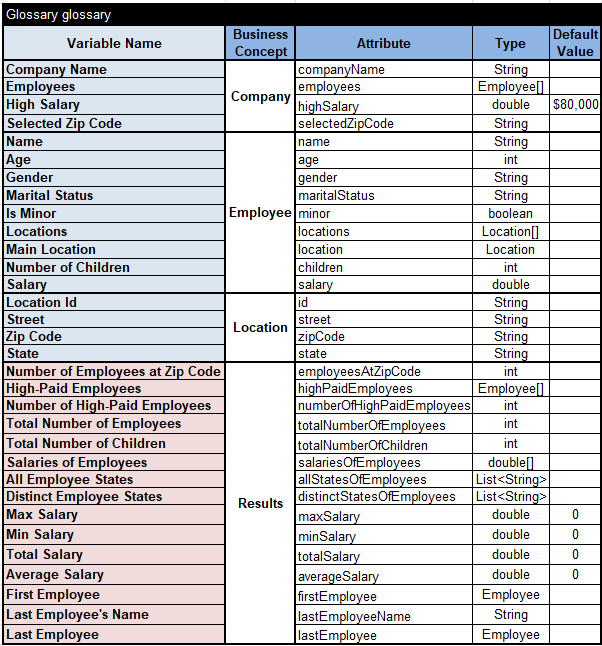
The test data for this project is almost the same as for the model “Iterations”. However, we can see many more output decision variables. We still could use iteration loops with decision tables to calculate all of them, but it will be a lot of decision tables. Instead, we may use only one decision table to calculate most of these variables:
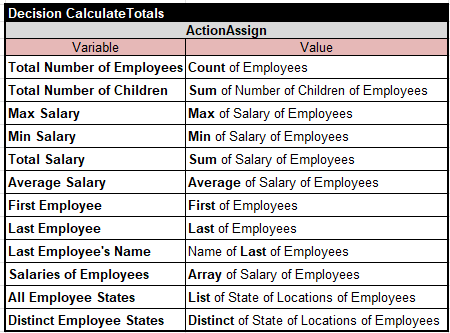
It is one decision table instead of 10 or more. It uses the predefined column “ActionAssign” which assigns a value in the second sub-column to the decision variable defined in the first one. The expressions inside the second sub-column start with the names of special functions defined on collections:
Count, Sum, Max, Min, Average, Array, List, Set, DistinctArray, DistinctList, First, and Last.
Note that the connector “of” was used multiple times between names of variables and/or business concepts inside such expressions as Name of Last of Employees, Distinct of State of Locations of Employees, etc. Like in plain English, “of” or “Of” is used to introduce prepositional phrases which are complements of nouns, creating the pattern: noun of noun, noun of noun of noun, etc. Instead of nouns you may use any decision variable or business concept already declared in the Glossary of inside for-each loops.
 Decision Intelligence Platform