

Download and Install

You may download a free Evaluation version or purchase an OpenRules Subscription. In both cases, you will receive a fully functional OpenRules Platform in one of these files:

- “OpenRulesDecisionManager_x.y.z.zip” for Windows
- “OpenRulesDecisionManager_x.y.z.tar.gz” for Mac or Linux.
Unzip this file to your hard drive, and you will see the folder “OpenRulesDecisionManager_x.y.z” that contains OpenRules Decision Manager with examples and documentation:
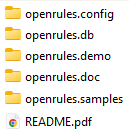
To install OpenRules Platform, you need to open the folder “openrules.config” and double-click on “install.bat” (or run “install” if you use Unix or Mac). The installation may take up to 1-2 minutes based on your internet connection speed, displaying all downloadable files on the “black” screen. Internally, OpenRules uses Maven plugins, but you don’t have to know anything about Maven or even Java (just have them pre-installed).
Make sure that during the installation, you don’t receive any red messages and at the end, you will see the message: “OpenRulesDecisionManager x.y.z: INSTALLATION COMPLETED”
P.S. If during the installation you are experiencing issues with downloads, please check your proxy settings as described here.
Any issues? Contact support@openrules.com – we will help.
After Installation
After successful installation you may start working with various examples and documents available from these folders:
- openrules.demo: different variations of the VacationDays project with examples of various deployment options
- openrules.samples: more than 50 sample projects that demonstrate various OpenRules decision modeling capabilities
- openrules.doc: user manuals and the license agreement
- openrules.db: samples of the OpenRules integration with relational databases – see Rule DB.
You will be able to execute the standard decision projects, create your own decision models, deploy them on-cloud or on-premise, and execute them using your preferable communication interface such as JSON, XML, or Java.
For instance, go to the folder “openrules.demo/VacationDays/” and click on “test.bat”. It will build and execute the proper decision model. Click on “explore.bat” to start OpenRules Graphical Decision Modeling IDE and you will be able to analyze and debug this decision model. Similarly, you may run other examples or create your own decision models.
When you execute the decision model, the Decision Manager produces a user-friendly execution protocol and explanation reports in the HTML format in the generated folder “target/reports“. They also can be seen from OpenRules Explorer.
If you use Linux or Mac OS: The main difference with Windows is that to start any execution, you will use scripts like “install”, “clean”, “test” instead of “install.bat”, “clean.bat”, “test.bat”.
Additionally, you may install Rule Learner and Rule Solver.

 Decision Intelligence Platform