

This is an example of multiple decision models and services built for one problem domain, in this case the Loan Origination domain. It demonstrates how to build a domain-specific library of loosely coupled decision microservices and use them to assemble larger decision services for smaller ones.
You may freely download, analyze, build, and execute it from here:
- LoanServices.zip – a workspace with simple and complex decision models
Loan Origination Problem
We will demonstrate how to build loan origination decision models to implement the problem described in the Decision Model and Notation (DMN) standard. This library implements the following services:
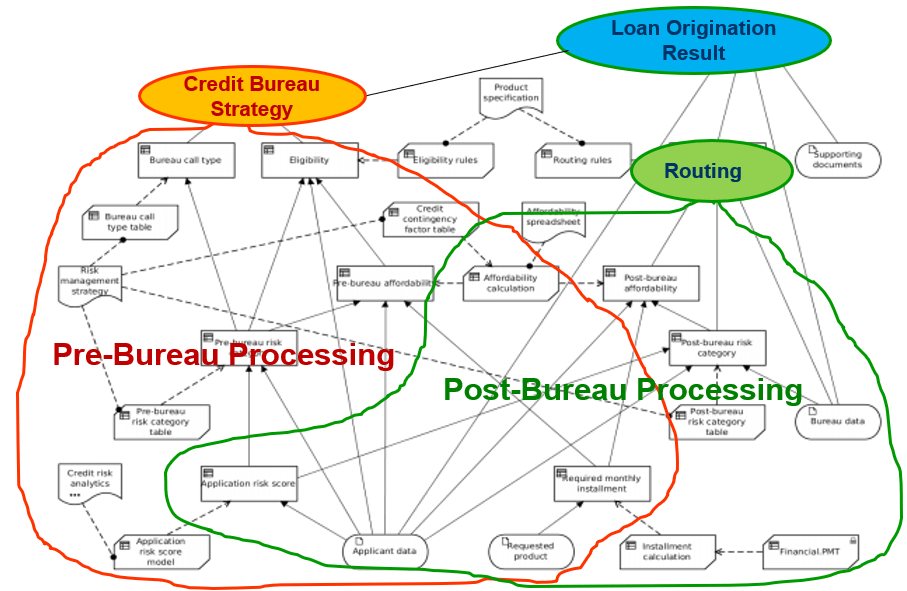
There are many business goals and sub-goals, but the main goal “Loan Origination Result” depends on two main business goals “BureauStrategy” (defined during Pre-Bureau Processing) and “Routing” (defined during Post-Bureau Processing).
Here is the structural scheme of the problem with different structural components:
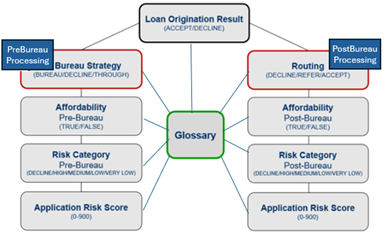
Below we describe how we created the library of small loosely-coupled decision microservices and used them to configure two relatively large decision services PreBureauProcessing and PostBureauProcessing. We deployed these two services as AWS Lambda functions and used them to configure the high-level decision service “LoanOriginationResult”.
How Decision Services are Organized – Rules and Tests Repository
After you download “LoanServices”, you will see that it isn’t anymore one monolithic decision model placed in one decision project. It is rather a library of interrelated decision models distributed between three major folders:
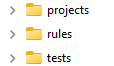
Instead of repeating folders “projects”, “rules”, and “tests” inside each decision model, we created sub-folders for each decision model inside these folders. For example, the folder “projects” represents all decision projects for all our decision models:
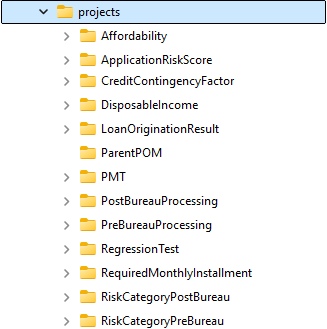
These folders contain files needed to build, test, explore, and deploy different decision models:
- pom.xml
- project.properties
- test.bat
- explore.bat.
There are two special sub-folders:
- ParentPOM: contains “pom.xml” with common dependencies for all decision models.
- RegressionTest: contains configuration files to test all decision models with one click.
The folder “rules” represents Excel files with business logic for all decision models:
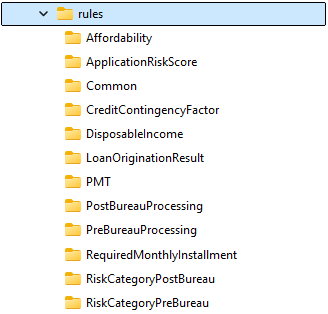
The folder “Common” contains two files with common information for all decision models:
- DecisionModel.xls
- Glossary.xls.
Here is the common Glossary:
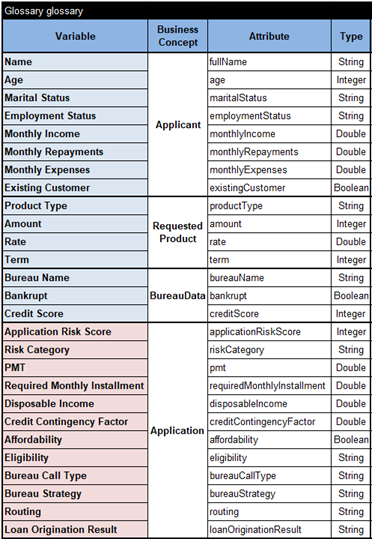
This Glossary will serve ALL included decision models. Here business concepts “Applicant”, “RequestedProduct”, and “BureauData” represent possible input data while “Application” contains the output of different decision models.
The file “DecisionModel.xls” has one Environment table:
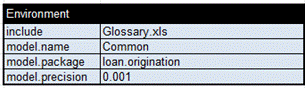
It is included in each decision model to refer to the common glossary.
The folder “tests” represents test cases for all decision models:
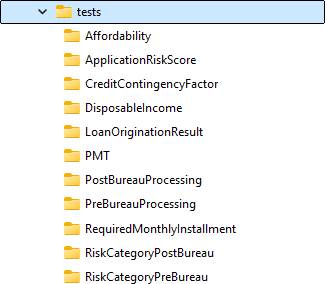
Such an organization of rules, tests, and projects follows the design principle of “Separation of Concerns” which simplifies the design of split decision models and their future enhancements. Now we can connect projects with their rules and tests considering different decision projects starting with the top-level project “LoanOriginationResult.”
Top-Level Decision Model
The top-level goal “Loan Origination Result” may take one of these three values: DECLINE, REFER, ACCEPT. It has two immediate sub-goals:
- Bureau Strategy with possible values DECLINE, BUREAU, THROUGH
- Routing with possible values DECLINE, REFER, ACCEPT.
Look at the graphical diagram of this decision model by clicking on “projects/LoanOrginationResult/expore.bat”:
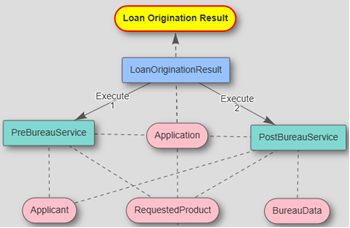
You can see that the top-level goal “Loan Origination Result” is defined by the decision table “LoanOriginationResult”. To determine this goal, it may invoke two decision services:
- PreBureauService
- PostBureauService.
These services are colored in green which means they have been already deployed as stand-alone decision services. Here is the proper decision table:
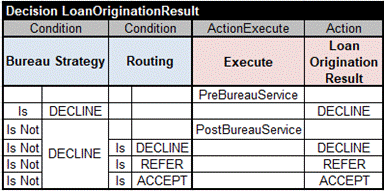
This is a multi-hit decision table with 2 conditions and two actions. The first rule unconditionally executes “PreBureauService” which determines the value of the decision variable “Bureau Strategy”. It can be one of three possible values: DECLINE, BUREAU, THROUGH.
The second rule will check if the Bureau Strategy was set to DECLINE. If yes, then it will set “Loan Origination Result” to DECLINE as well. If it is not DECLINE, then the third rule will execute “PostBureauService”. It will assign one of 3 values DECLINE, REFER, or ACCEPT to the decision variable Routing.
Finally, one of rules 4,5, or 6 will assign the same value to “Loan Origination Result”. Note that this decision model does not have to know how these pre-bureau and post-bureau services actually work, but it does know how to invoke them and use their results.
Other implementation details of this top-level decision model are defined in the configuration file “project.properties”:

The main model’s file “DecisionModel.xls” is located in the folder “../../rules/LoanOriginationResult/” and the test file “Test.xls” is in “../../tests/LoanOriginationResult/”.
Here the characters “../../” represent a relative path from the folder “projects” (where “project.properties” is located) to the folders “rules” and “tests”.
The file “DecisionTable.xls” contains only one Environment table:
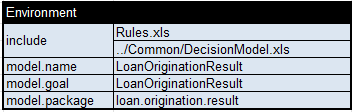
Please note that besides “Rules.xls” this project includes a reference to “../Common/DecisionModel.xls”. It allows us to include the common Glossary in this project. Similarly, we can make different decision models to share the common glossary and potentially other common information.
The test cases for this decision model are specified in the file “../../tests/LoanOriginationResult/Test.xls”:
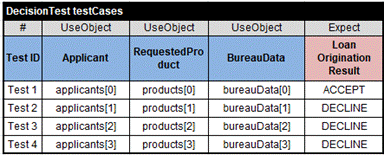
The first 3 columns refer to the arrays “applicants”, “products”, and “bureauData” described in the following DecisionData tables:
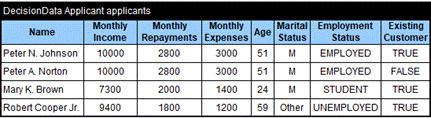
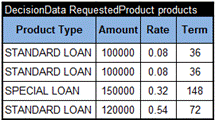
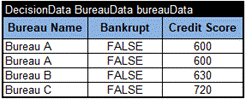
While our top-level decision model LoanOriginationResult deals only with variables “Bureau Strategy”, “Routing”, and “Loan Origination Result”, to get the expected results we still need to provide information about Applicant, RequestedProduct, and BureauData. It is needed to execute already deployed decision services “PreBureauService” and “PostBureauService”.
Deployed Decision Services
These two decision services have been defined in the table of the type “DecisionService” (see file “rules/LoanOriginationResult/Rules.xls”):

Here the first column uses the names of the included services exactly the same as in the decision table “LoanOriginationResult” that executes these services. The second column “Service Type” tells OpenRules that these services have been deployed as AWS Lambda functions with endpoints defined in the third column. Instead of AWS Lambdas, the same decision models can be deployed using different deployment options without any changes in the business logic.
The column “Service Endpoint” contains the names under which these services were deployed and can be invoked from outside. In this case, PreBureService was deployed with the endpoint “PreBureauProcessing” and PostBureauService was deployed with the endpoint “PostBureauProcessing”.
Let’s look at the proper decision models “PreBureauProcessing” and “PostBureauProcessing”. The folder “rules/PreBureauProcessing” contains two files “DecisionModel.xls” and “Rules.xls” – this is similar to the top-level model. The file “DecisionModel.xls” contains only one Environment table:
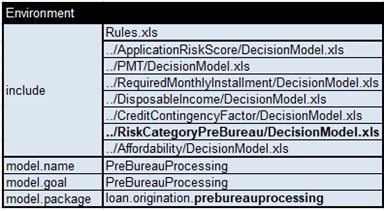
Its include-statement refers to “Rules.xls” and also many other decision models that will be used by PreBureauProcessing.
The table “Rules.xls” contains several decision tables starting with this one:
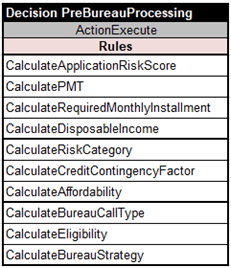
It executes certain decision tables in the top-down order. The first four tables do simple calculations common for both PreBureauProcessing and PostBureauProcessing. Let’s look at the proper table from PostBureauProcessing/Rules.xls:
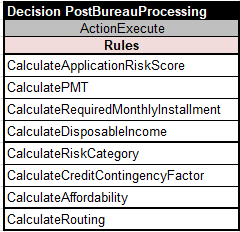
You can see that there are two tables with the same name “CalculateRiskCategory”: one is located in rules/RiskCategoryPreBureau and another one – in rules/RiskCategoryPostBureau. They both define the decision variable “Risk Category” but apply different logic for pre-processing and post-processing. This is another reason why decision models PreBureauProcessing and PostBureauProcessing should be deployed as different decision services. Otherwise, we would violate the important limitation that all decision variables and tables should have unique names within the same decision model.
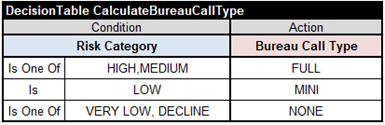
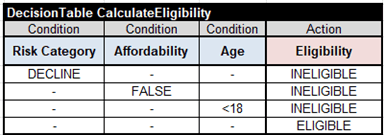
PreBureauProcessing invokes three decision tables CalculateBureauCallType, CalculateEligibility, and CalculateBureauStrategy:
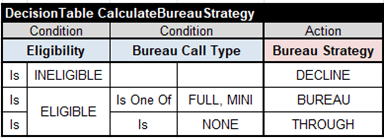
Finally, PostBureauProcessing invokes only one table CalculateRouting:
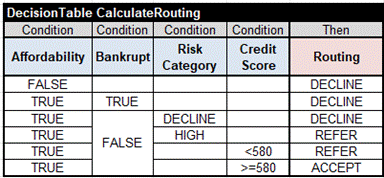
We may test both these models as stand-alone decision models using different test cases in the folder “tests”. And we may deploy them as AWS Lambda functions by simply executing “deployLambda.bat” in their sub-folders “projects”.
All other decision models have been implemented as stand-alone decision models with a very similar structure. We can test them separately or as components of larger decision models.
Executing Decision Services
After downloading “LoanServices”, first, you need to run “/projects/ParentPOM/install.bat”. Then you may build and test different decision models separately by executing “test.bat” from their sub-folders from the folder “projects”. For instance, you may build and test “ApplicationRiskScore” by executing”/projects/ApplicationRiskScore/test.bat”.
To deploy the decision model “PreBureauProcessing” as an AWS Lambda function you need to change its file “/projects/PreBureauProcessing/project.properties” to point to your own AWS account. Then you may execute “deployLambda.bat”. The same should be done for “PostBureauProcessing”.
After a successful deployment of the above two AWS Lambda functions, you will be able to execute the top-level decision model “LoanOriginationResult” (that invokes these Lambda functions) using “/projects/LoanOriginationResult/test.bat”.
Regression Testing
When you have many decision models (sub-models) it is important to have the ability to test them all at once. These regression testing capabilities are demonstrated in the folder “/projects/RegressionTest/” which includes two files “projects.txt” and “test.bat”. The file “project.txt” simply lists all included projects:
- ../ApplicationRiskScore
- ../CreditContingencyFactor
- ../DisposableIncome
- ../PMT
- ../RequiredMonthlyInstallment
- ../RiskCategoryPreBureau
- ../RiskCategoryPostBureau
- ../Affordability
- ../PreBureauProcessing
- ../PostBureauProcessing
- ../LoanOriginationResult
When you execute “RegressionTest/test.bat” it will execute the proper tests for all these projects. You should run the regression test every time you change the glossary or rules inside any decision model to make sure that other decision models are not affected and continue to execute their tests as expected.
 Decision Intelligence Platform