

Problem
Graphical Interface
Finding Optimal Decisions
Underlying Decision Model
Problem [see DMCommunity’s Oct-2025 challenge]
A freelance web designer received a task. A client has a budget of $10,000 and wants a webpage developed with as many features as possible, but also maximizing the total value of these features:
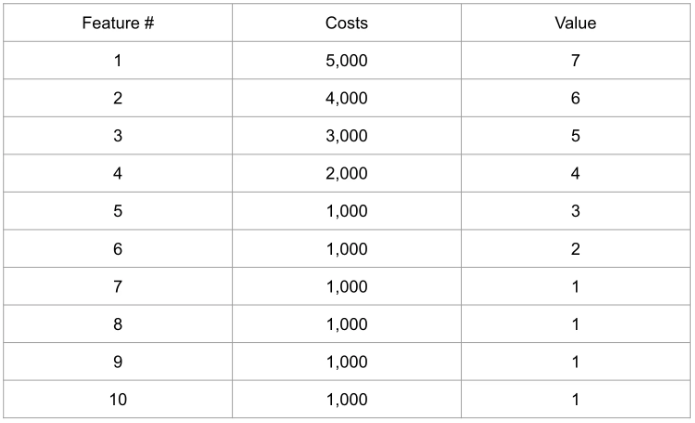
The client leaves the decision of which features to the developer. She wants to delight the client and asks you which features would be best to select. We have the budget constraint and two objectives. Can you devise a rational way to trade them against each other?
The proper decision model is implemented as a simple project, “Features”, included in the OpenRules Rule Solver. You can see its implementation at the end of this page. We will use Decision Playground to generate various website design decisions using the same decision model.
Click on “Features/play.bat” to start Decision Playground. Decision Playground can be used with different underlying open-source or commercial Constraint Solvers or Linear/MIP Solvers as defined by the environment variable SOLVER in the launch file “play.bat”:
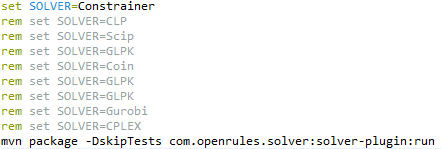
We will use the open-source constraint solver “Constrainer”.
Here is your Playground’s view after you click on “New Request” to select a JSON file with input data:

The proper JSON files, such as “testCases-1.json,” were generated based on the test cases in Excel during the testing of the decision model.
Let’s say we first want to maximize the Total Value. So, we may click on the button “Optimize” and select “Total Value” and “Maximize”:

The Playground will run the decision model to quickly produce the proper optimal decision:
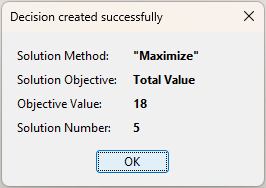
We may analyze the found optimal decision in the bottom part of the Playground screen:
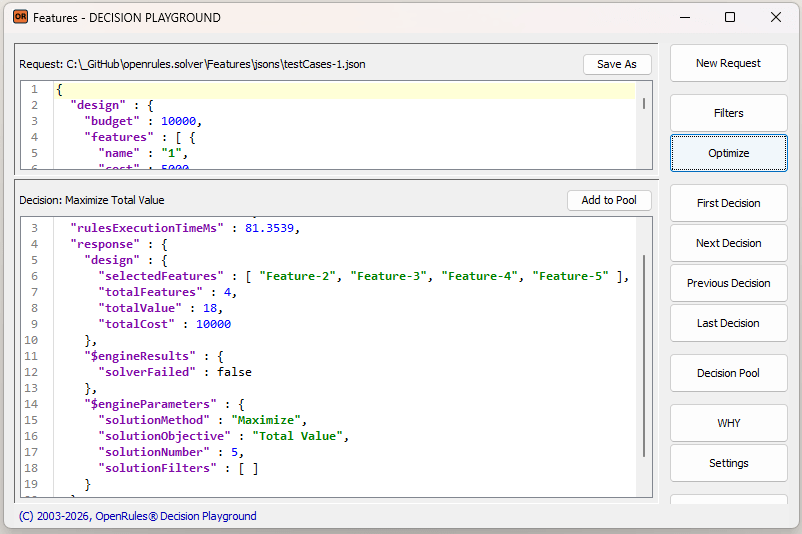
This decision selects features 2, 3, 4, and 5 to achieve the maximum possible total value of 18 while spending $10,000. We may memorize this decision in the Decision Pool by selecting “Add to Pool”:

Probably, we would like to add more features, even if the total value would go slightly smaller. To do this, we may choose a different optimization criterion, “Total Features”:

We will receive the following decision, which we will also add to the Decision Pool:

So, now we have 7 features (4, 5, 6, 7, 8, 9, and 10), but the total value went down from 18 to 13. At the same time, the total cost became $2,000 less.
Let’s say it is still important for us to have Feature 2 and 3 included. We may achieve this by adding “mandatoryFeatures” : [ “2”, “3” ] to the request and again select “Total Features” and “Maximize”. We will receive:

This decision has “Total Value” 14 and includes 5 features: 2, 3, 8, 9, and 10.
What if we try to maximize the “Total Value” instead of “Total Features”? Here is the resulting decision:
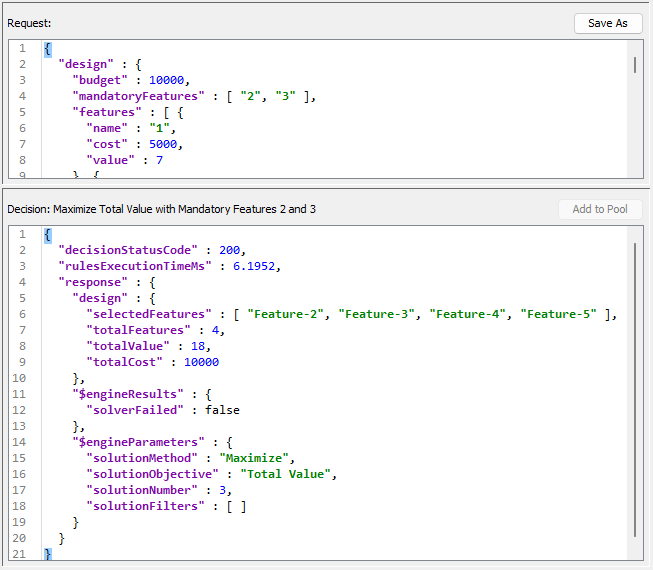
“Total Value” hit the maximum 18, but features 8, 9, and 10 were replaced with 4 and 5.
We may compare all the found 4 decisions inside the Decision Pool:

We can continue experimenting with different filters and optimization objectives to obtain the decisions that best suit our situation.
This example is based on a very simple decision model – see file “openrules.solver/Features/rules/DecisionModelFeatures.xls”. Here is the Glossary:

Here are two main methods, “Define” and “Solve”, that are pretty common for decision models utilizing Rule Solver:

The table “DefineFeatureVariables” for each Feature in the input array “Features” defines the proper constrained decision variables with names like “Feature-1” or “Feature-2” with possible values from 0 (skipped) to 1 included):

It also adds all feature variables to the array “Feature Variables” needed to specify optimization objectives.
The table “DevineFeatureCoefficients” is a regular OpenRules table that accumulates all costs inside the array “Feature Costs” and all values inside the array “Feature Values”:

We can use these arrays to define the optimization objectives in the following table:

The table “PostLimitConstraints” posts the constraint “Total Cost < Budget”:

The table “PostFeatureConstraints” for each FeatureName in the input array “Mandatory Features” posts a constraint that states that this feature should be included:

And finally, we define the table “SaveSolution” that will be automatically invoked from the method “Solve“:

 Decision Intelligence Platform