

This decision model deals with employees of a company, and it needs to determine the minimum or maximum salaries, the total number of children, all locations where the employees live, and to respond to similar requests. It is included in the standard installation as “Iterations“.
Let’s start with the Glossary:
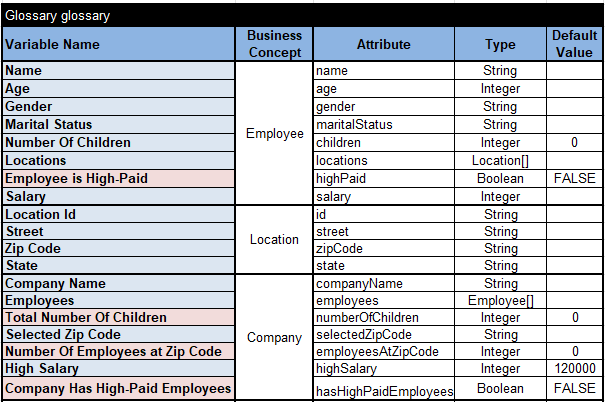
Here we have the business concept “Company” that includes the array of employees. The variable “Employees” is an array with elements of our own type “Employee”. We defined its type as “Employee[]”. Each employee has regular attributes Name, Age, Gender, Marital Status, Salary, and Number of Children. An employee can have residences in multiple Locations, a decision variable of the type “Location[]”. The business concept “Location” along with a unique Location Id includes the address information (Street, Zip Code, State).
The objective of this decision model is to determine values for output decision variables (marked as pink).
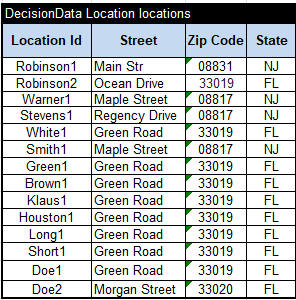
Out test cases should reflect the quite complex organization of data: “Company => Employees => Locations”. The following table describes all employees:

The last column “Locations” uses “>locations” in the second row to refer to the locations presented in this table:
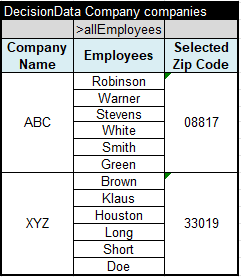
And finally we can define two test companies as follows:
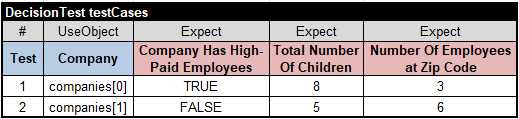
Here are the corresponding test cases with expected values:
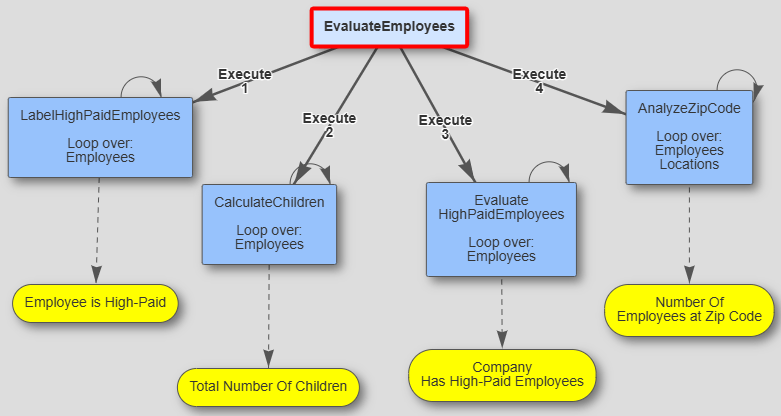
This model will invoke 4 decision tables to calculate the output values:
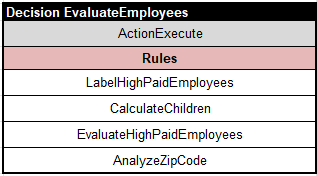
Here is the first table:
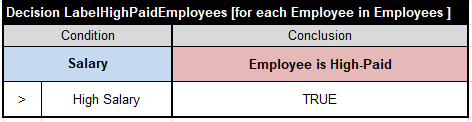
It iterates over the array of Employees applying to each Employee the rule: if the current Employee has Salary >= High Salary then assign TRUE to the decision variable “Employee is High-Paid”.
The next table
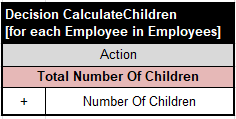
calculates the Total Number of Children.
The table “EvaluateHighPaidEmployees” iterates over Employees but breaks the iteration when it find the first high-paid employee:
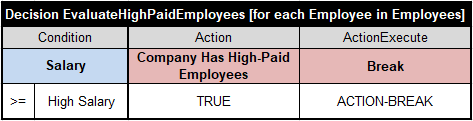
And finally the next table uses two nested iterations to calculate Number Of Employees at the Selected Zip Code:

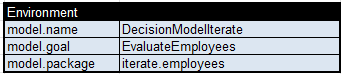
This model also uses this “Environment” table:
To execute our test-cases, we may simply double-click on the standard bat-files test.bat. Here are the execution report for the second test-case with explanation which rules were actually executed and why:

Here is the decision diagram generated by OpenRules Explorer:
You may find more decision modes with iterations in the standard repository “openrules.samples:”
- AnalyzeEmployees
- AnalyzeEmployeesWithoutLoops
- AggregatedValues
- MedicalServiceCoverage
- ICD10
- FlightRebooking
 Decision Intelligence Platform