

Business Logic

This decision model captures the decision logic required to assist a physician in determining the appropriate therapy for a patient diagnosed with Acute Sinusitis, based on the medical guidelines below.
Medication Rules:
If the patient is 18 years old or older, then a therapy choice is Amoxicillin.
If the patient is younger than 18, a therapy choice is Cefuroxime.
If the patient is Penicillin-allergic, the therapy of choice is Levofloxacin.
Dosing Rules:
For patients younger than 15 or older than 60, the dose is 200mg every 24 hours for 14 days. For patients between 15 and 60, the dose is 500mg every 24 hours for 14 days.
If the patient’s creatinine level (PCr) > 1.4 and the patient’s creatinine clearance < 50 ml/min, then the dose is 250 mg every 24 hours for 14 days.
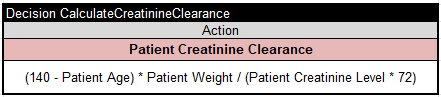
Creatinine clearance (CCr) should be calculated according to the formula:
CCr [ml/min] = (140 – age) x Lean Body Weight [kg] / (PCr x 72)
Drug Interaction Rules:
Check if a patient is on active medication. Coumadin and Levofloxacin can reduce the effectiveness of Coumadin. Produce the proper warning.
Decision Model Implementation
The ultimate goal “Patient Therapy” can be presented in the decision table “DeterminePatientTherapy”:
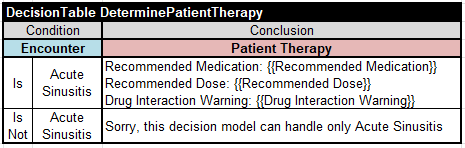
The condition in the first allows us to limit our decision model to the Encounter Diagnosis “Acute Sinusitis” only. From the definition of the Patient Therapy we may conclude that we need to specify 3 sub-goals:
- Recommended Medication
- Recommended Dose
- Drug Interaction Warning
To specify the sub-goal “Recommended Medication” we can use the following multi-hit decision table:
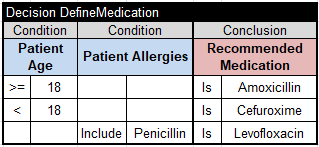
This table of the type “Decision” by executing all satisfied rules allows us to override a recommended medication if the patient is allergic to Penicillin.
To specify the sub-goal “Recommended Dose” we can use the following decision table (also multi-hit):
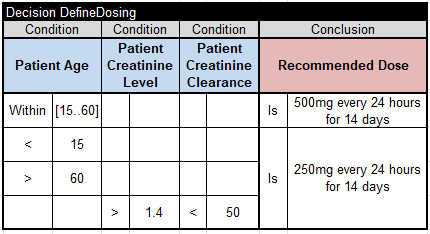
Patient Age and Patient Creatinine Level should be known to define Recommended Dose. We also need to calculate Patient Creatinine Clearance using the above formula. It can be done using the following unconditional table:
Finally, we can define “Drug Interaction Warning” using the following decision table:
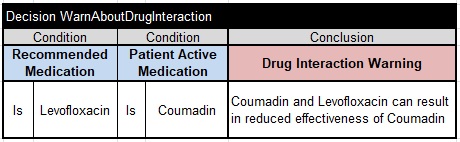
We placed all these 4 decision tables in the file “rules/Rules.xlsx”.
To complete our decision model, we need to put all decision variables (goals and input variables used in the above tables) in one Glossary :
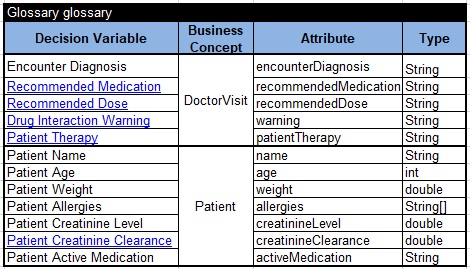
The glossary is located in the file “rules/Glossary.xlsx”.
Test cases with expected results defined in this table:
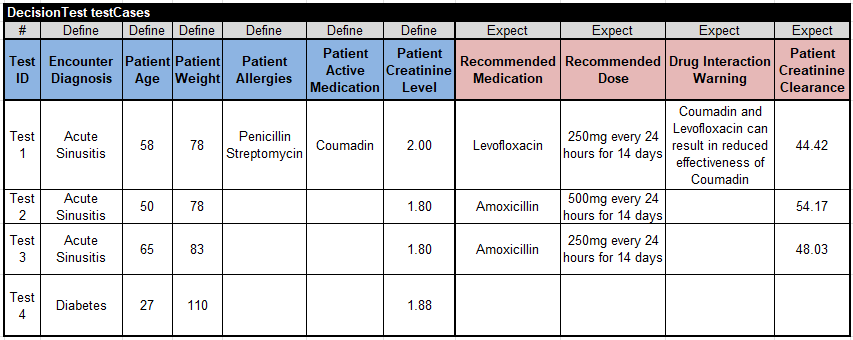
We placed this table in the file “rules/Test.xlsx”.
We also created the file “rules/DecisionModel.xls” that contains only one table of the type “Environment” that tells OpenRules where all related files are located:

To execute these test-cases, we should adjust the standard file “project.properties“:
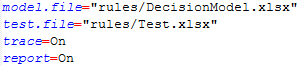
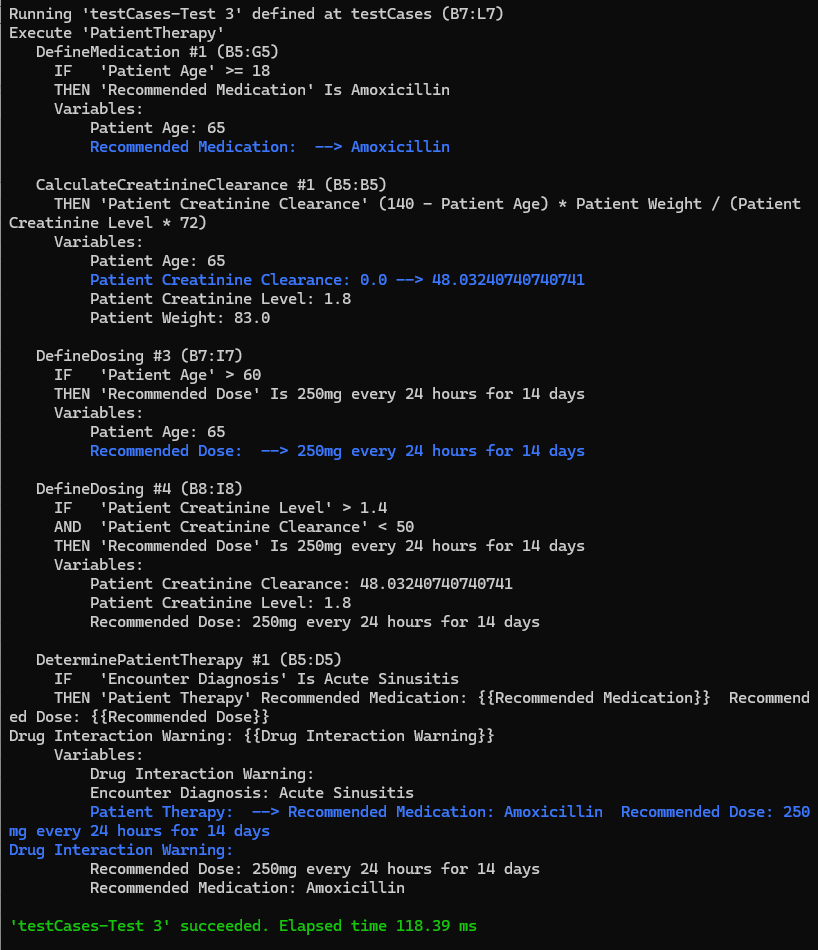
To execute our test-cases, we may simply double-click on the standard bat-file test.bat that will automatically determine all dependencies within the decision model, transform the model into executable code, and execute the model against all test cases. Here are the execution results for Test 3:
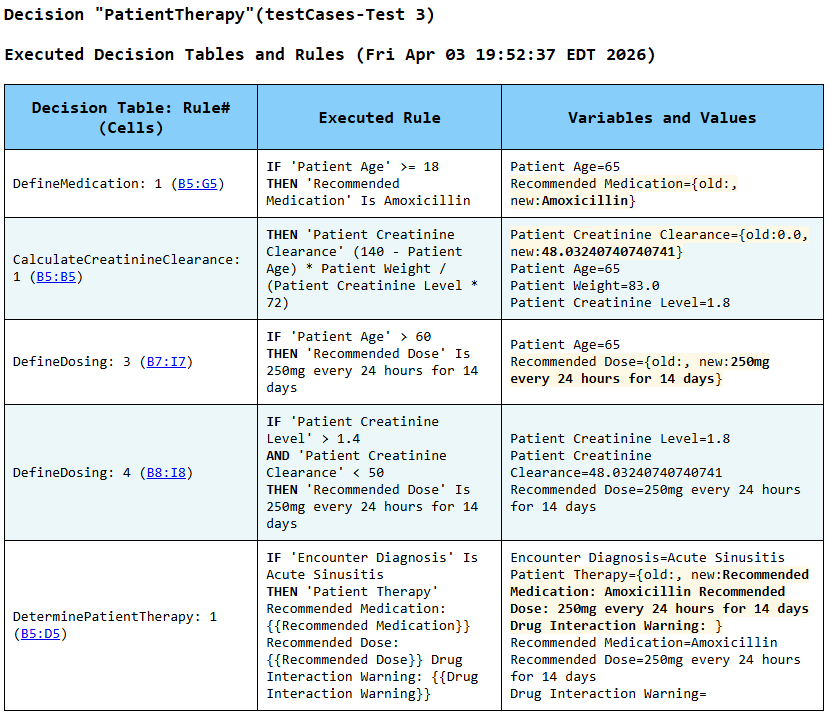
Here is the automatically generated HTML report that explains which rules were actually executed and why:
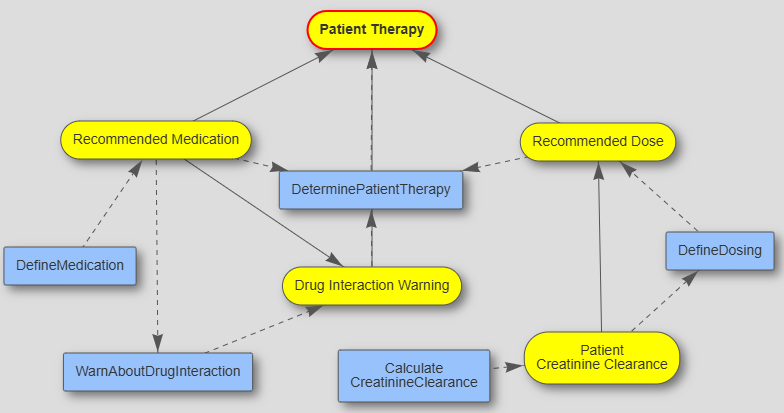
If you run “explore.bat,” you will see this automatically created decision diagram
You will also be able to debug each test case, executing them in the rule-be-rule mode.
P.S. This described decision model is available in the folder openrules.samples/INTRO/PatientTherapy.
P.S.S. A more advanced version is available in the folder openrules.samples/ADVANCED/PatientTherapyAdvanced.
 Decision Intelligence Platform