

OpenRules-based business decision models can be packaged as WAR files and then deployed to any applications servers such as Apache Tomcat, Red Hat JBoss, Oracle WebLogic, and others.

OpenRules utilizes Maven plugin “maven-war-plugin” to package any tested decision model into a deployable war file.
Sample Project. The sample project “VacationDaysServlet” is included into the standard OpenRules installation. It demonstrates how to deploy a business decision model as a WAR file. It builds a WAR file for the already created and tested decision model “VacationDays”. It adds the property “deployment=war” to the file “project.properties”:
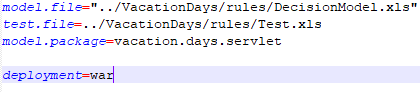
This project also includes adjusted files “pom.xml” and package.bat”. You may simply double-click on “package.bat” or execute the command
VacationDaysServlet>mvn clean package war:war
It will automatically create the WAR-file VacationDaysServlet\target\VacationDays.war.
The attributes of the was-file are defined in the file “pom.xml” in the section “plugins”:
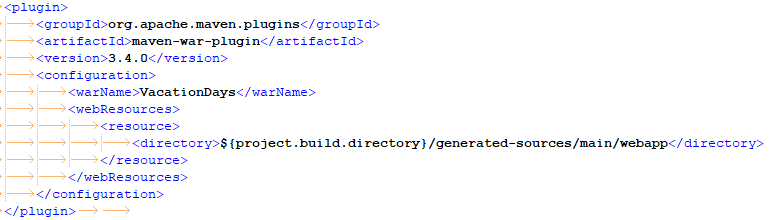
Here <warName> defines the context name for the deployed service servlet.
The endpoint for the deployed service is taken from the decision model’s Environment table and in this case is “vacation-days-model“. You may change it for instance to “my-vacation-days” adding the property “model.endpoint=my-vacation-days” in the file “project.properties”.
Deploying your WAR file. Now you can deploy the generated file to your selected application server as any other WAR file. For example, for Apache Tomcat you may simply copy file “VacationDays.war” to the folder “webapps” and start Tomcat. Then in your browser you may type this URL:
http://localhost:8080/VacationDays
It will show you the actual endpoint URL like below:

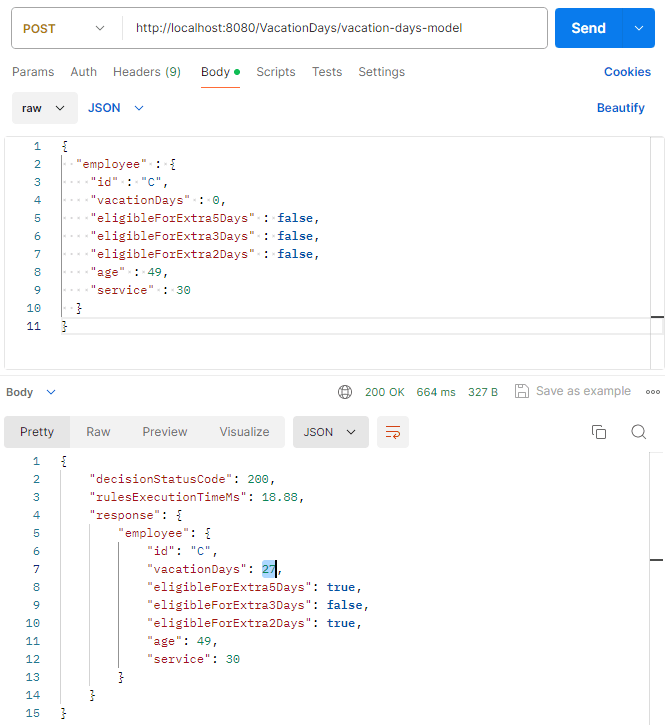
Testing Your Decision Service. You may test this decision service with the popular development tool POSTMAN by proving the generated URL and entering test data from the folder “jsons”. Make sure you select “POST” (not “GET”). Here is an example:
 Decision Intelligence Platform